ASO Tool Alternatives
Best ASO Tools for Indie Developers
A practical listicle for solo developers and small app teams choosing ASO tools. Compare keyword research, privacy, export control, analytics, and budget fit.
Indie ASO is a different job from enterprise ASO. You are not managing a portfolio of hundreds of apps, a paid user acquisition team, and weekly stakeholder reports. You are trying to choose the right keywords, write better App Store metadata, spot realistic country opportunities, and learn whether your changes actually moved rankings.
That makes the right ASO tool for an indie developer less about the biggest feature list and more about workflow fit. Your tool should help you make better choices without asking you to hand over more budget, data, or process than the stage of your app can justify.
This guide ranks ASO tools through that lens: keyword research quality, privacy, export/control, analytics coverage, and budget sensitivity for solo developers and small app teams.
What indie developers should look for
Before comparing logos, decide what job the tool needs to do. For most indie iOS apps, these are the buying criteria that matter most.
| Criterion | Why it matters for indie apps | What to prefer |
|---|---|---|
| Keyword scoring | You have limited title, subtitle, and keyword-field space. | Popularity, difficulty, opportunity, and competitor context in one workflow. |
| Privacy | Your keyword research can reveal your positioning before you ship. | Local-first storage, no account for core workflows, and clear data movement. |
| Export and control | You may use spreadsheets, notes, Git, or your own launch checklist. | CSV or copyable outputs that do not trap your research in a dashboard. |
| Country discovery | Indies often win by avoiding the most crowded first market. | Country-level keyword opportunity, not only one default storefront. |
| Budget fit | An app can be promising before it has steady revenue. | Free core workflows first; paid upgrades only when they remove real work. |
Quick ranking
| Tool | Best indie fit | Watch for |
|---|---|---|
| RespectASO | Local-first iOS keyword research, country opportunity scanning, transparent scoring, and CSV exports. | Mac-focused workflow; Pro AI features require your own LLM API key. |
| Astro | Mac ASO workspace for developers who want a polished subscription tool with keyword tracking and translation. | Subscription model; some product analytics and crash tooling are part of the app ecosystem. |
| App Store Connect | Official app analytics, product page management, tests, reviews, and sales data. | Not a keyword discovery or competitor scoring tool. |
| Appfigures | App analytics, rank monitoring, keyword tracking, review management, and growth reporting as your portfolio expands. | ASO depth grows with higher plans; can be more than a one-app indie needs at launch. |
| AppTweak | Broad ASO, competitor, Apple Ads, review, and market intelligence workflows for scaling teams. | Strong platform scope can be larger than a solo keyword workflow. |
| AppFollow | Review management, ratings, app monitoring, integrations, and some ASO tracking. | Best when feedback and reputation workflows matter alongside ASO. |
| Asodesk | Free ASO utilities, top charts, keyword tools, localization references, monitoring, and review workflows. | Broader platform features may matter later more than during first metadata research. |
| MobileAction | ASO intelligence, Apple Ads, ad creative, and market workflows for paid growth teams. | Most useful when you are already operating acquisition campaigns or deeper growth analysis. |
| Sensor Tower | Market, app, advertising, gaming, audience, and category intelligence. | Designed around strategic market visibility, not a lightweight indie metadata loop. |
1. RespectASO
Best for: indie developers who want local-first iOS keyword research with transparent scoring and exportable results.
RespectASO is built for developers who want the core ASO loop close to the product work: research keywords, inspect competitors, compare countries, export the results, rewrite metadata, and track ranking changes. The free edition includes keyword popularity and difficulty scoring, ranking difficulty tiers for Top 5, Top 10, and Top 20, competitor analysis, app rank tracking, search history, CSV export, and the Country Opportunity Finder.
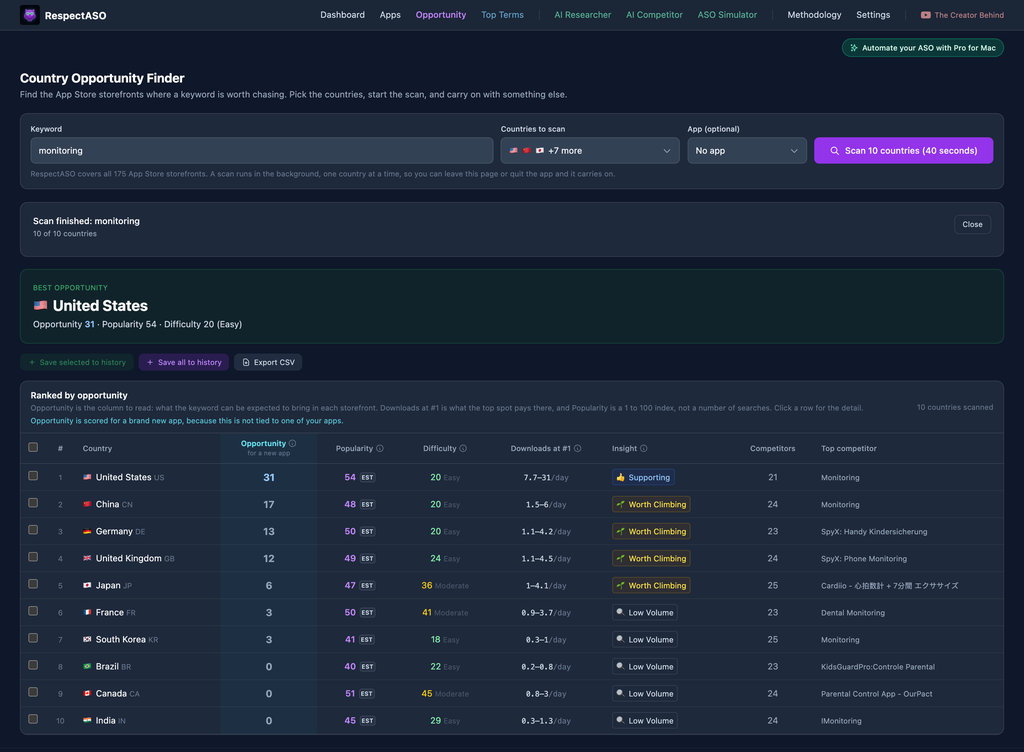
The Country Opportunity Finder is especially useful for indies because it scans the supported App Store markets for one keyword and ranks countries by opportunity. Instead of assuming the United States is the only launch battleground, you can find countries where a keyword combines better demand with lower competition.
The privacy model also fits indie work. Core workflows run locally on your Mac with no RespectASO account, no desktop telemetry, and local storage for keyword research and settings. RespectASO uses public App Store data, with Apple's public iTunes Search API as the primary data source. Pro adds AI Niche Researcher, AI Competitor Analyzer, and ASO Score Simulator; those workflows use your own LLM API key and send AI prompts to the provider you choose.
Choose RespectASO if you want a focused iOS ASO workflow, prefer owning your research data locally, and want to decide whether Pro AI workflows are worth adding after you have used the free core features.
2. Astro
Best for: Mac users who want a dedicated ASO subscription app with a polished keyword tracking workspace.
Astro focuses on App Store keyword visibility for macOS users. Its public product page emphasizes keyword tracking, popularity and difficulty data, keyword suggestions, rankings, competitor keyword extraction, translation, and support across many countries. Its privacy policy says projects, saved keywords, CSV imports, and a DeepL API key are stored locally, while the product also uses services for payments, analytics, crash reports, and aggregated keyword data.
Choose Astro if you want a Mac-first subscription ASO product and you value a streamlined app interface for ongoing keyword monitoring.
3. App Store Connect
Best for: official analytics, product page management, reviews, TestFlight, and App Store performance reporting.
App Store Connect is not an ASO keyword research tool, but every indie developer should use it. Apple lets you manage app name, subtitle, keywords, description, screenshots, previews, product page optimization, custom product pages, reviews, sales, units, and performance analytics from the official developer console.
The limitation is keyword discovery. App Store Connect tells you what happened after your app was live; it does not score candidate keywords, compare competitor search results, or tell you which country is easiest to target before you rewrite metadata.
Choose App Store Connect if you need the official source of performance truth and use a separate ASO research tool for pre-release keyword decisions.
4. Appfigures
Best for: indie developers with multiple apps or a growing need for app analytics, rank monitoring, keyword tracking, and review workflows.
Appfigures is built around app analytics and growth reporting. Its pricing page describes plans that cover app analytics, ASO and Apple Ads workflows, keyword rank tracking, keyword popularity scores, competitor keyword tracking, keyword suggestions, review management, app intelligence, store performance, and market insights.
For a solo developer, the fit depends on how much of that broader analytics layer you need. If you only need to research metadata for one iOS app, start narrower. If you are tracking several apps, monitoring reviews, and looking at revenue, downloads, and keyword movement together, Appfigures becomes more relevant.
Choose Appfigures if your indie portfolio is becoming a business dashboard, not just a keyword research task.
5. AppTweak
Best for: teams that want one broad app growth platform for ASO, Apple Ads, reviews, competitors, market intelligence, and AI agents.
AppTweak focuses on maximizing app visibility and organic growth while also supporting Apple Ads campaign work, review management, AI agents, market intelligence, reporting, and competitor monitoring. That makes it a serious option for app teams that have moved beyond a single founder's metadata workflow.
For indies, the question is timing. If your app already has meaningful revenue, paid acquisition, localization priorities, or a team member dedicated to growth, a broad platform can save time. If you are still validating your first metadata loop, its scope may be more than you need.
Choose AppTweak if your indie app is scaling into a structured growth operation and you want ASO connected to ads, reviews, competitors, and reporting.
6. AppFollow
Best for: apps where ratings, reviews, replies, integrations, and monitoring sit close to ASO work.
AppFollow is positioned around app reputation, review management, ratings, automation, integrations, alerts, analytics, and ASO tracking. Its free and paid plans include different levels of apps, keywords, countries, users, reports, integrations, ASO tools, and review workflows.
That can be useful for indie developers once user feedback starts arriving. If reviews are shaping your roadmap and conversion rate, a tool that combines review operations with ranking and ASO monitoring can make sense.
Choose AppFollow if your app's growth bottleneck is not only keyword discovery, but also review response, ratings analysis, and operational monitoring.
7. Asodesk
Best for: free ASO utilities and broad ASO monitoring when you want a browser-based toolkit.
Asodesk publishes free ASO tools for top charts, trending searches, conversion benchmarks, localization tables, keyword shuffling, and keyword density. Its broader platform includes ASO monitoring, top charts, category rankings, reports, review analytics, competitor research, app monitoring, and store console workflows.
For indie developers, the free utilities can be useful companions while you build your first research process. The broader platform becomes more relevant when you want continuous monitoring and review workflows across more markets and competitors.
Choose Asodesk if you want a browser-based set of ASO utilities and may later need monitoring, review, and competitor workflows in one product.
8. MobileAction
Best for: apps that are already investing in Apple Ads, market intelligence, ad creatives, and paid growth operations.
MobileAction covers ASO intelligence, Apple Ads, ad intelligence, market intelligence, API solutions, and managed services. Its public positioning focuses on helping app and game companies grow across the App Store and Google Play with app store, ad creative, and campaign optimization.
For an indie developer, this is usually a later-stage fit. It becomes more useful when you are combining organic ASO with paid user acquisition and need broader competitive and advertising visibility.
Choose MobileAction if your growth work includes paid campaigns and you want ASO intelligence connected to ad and market workflows.
9. Sensor Tower
Best for: market intelligence, category research, app performance visibility, advertising intelligence, gaming insights, and audience analysis.
Sensor Tower focuses on a broader digital market insights platform. Its public positioning covers app performance, app advertising, gaming, audience, web, and market intelligence, backed by app store APIs, panel data, models, and third-party datasets.
For indies, this is not the tool to start with if your immediate task is deciding what to put in the App Store keyword field. It can be valuable when you need market sizing, competitor strategy, category research, or investor-grade context.
Choose Sensor Tower if you need strategic market visibility more than a lightweight metadata research workflow.
Recommended indie ASO stack
Most indie developers do not need one tool to do everything. A practical stack can stay simple:
- RespectASO for local keyword research, difficulty scoring, competitor inspection, country opportunity discovery, ranking checks, and CSV export.
- App Store Connect for official analytics, product page experiments, reviews, sales, units, and metadata submission.
- One spreadsheet or notes file for hypotheses, metadata drafts, release dates, and ranking observations.
- Optional Pro AI workflows when you want AI Niche Researcher, AI Competitor Analyzer, or ASO Score Simulator to turn raw research into draft metadata and iteration ideas.
That setup keeps the first loop small: research, choose, ship, measure, and repeat. You can add broader tools later when your app has enough traction to justify deeper reporting, paid acquisition analysis, or team collaboration.
When to pay for more tooling
A paid ASO platform starts to make sense when one of these conditions is true:
- You manage several apps and need shared reporting across a portfolio.
- You track many competitors and countries every week.
- You run Apple Ads and need ASO data connected to campaign decisions.
- You have enough reviews that response workflows and sentiment analysis save real time.
- You need exports, alerts, integrations, or stakeholder reports beyond what a focused indie workflow covers.
If none of those apply yet, start with a smaller workflow and spend your attention on keyword choice, metadata clarity, product quality, and measuring the result of each release.
Bottom line
For most indie iOS developers, RespectASO is a strong starting point when your priority is local-first keyword research, transparent scoring, country opportunity discovery, and exportable research without a RespectASO account. Pair it with App Store Connect for official analytics, then add larger platforms when your app's scale makes their breadth useful.
For a deeper breakdown of when free workflows are enough, read Free vs Paid ASO Tools for Indie Developers. To compare broader platform options, see Best ASO Tools in 2026 and Best Free ASO Tools.
Start with a focused indie ASO workflow
Download RespectASO for local-first keyword research, country opportunity discovery, transparent scoring, competitor context, and CSV exports. Add Pro AI workflows when you want help drafting and testing metadata ideas.