ASO Tool Alternatives
Best Free ASO Tools
A practical guide to free App Store Optimization tools for keyword research, metadata checks, analytics, trend validation, and early-stage app growth.
What counts as a free ASO tool?
Free App Store Optimization tools usually fall into three groups: full keyword research apps with a free core workflow, browser utilities that solve one metadata problem, and native platform data from Apple or Google. The best free stack combines all three instead of expecting one tool to do everything.
For this list, we only include tools with a publicly documented free plan, free suite, or free native workflow. We also separate free core workflows from free trials, because a trial is useful for evaluation but not the same thing as a long-term free ASO workflow.
Selection criteria
| Criterion | What to look for |
|---|---|
| Keyword research | Can you discover, score, or validate App Store search terms without paying first? |
| Metadata checks | Can you catch title, subtitle, keyword-field, spacing, duplicate, or character-limit problems before submission? |
| Data transparency | Can you understand where the signal comes from, whether it is App Store data, public autocomplete, analytics, or broader web trends? |
| Privacy and control | Can you run sensitive research locally or export your work instead of locking everything inside a hosted dashboard? |
| Upgrade path | Can the same workflow grow into paid monitoring, collaboration, or AI support when the app portfolio needs it? |
1. RespectASO Free Edition
RespectASO is a Mac app for iOS App Store keyword research. The free edition includes keyword popularity and difficulty scoring, competitor research, the Country Opportunity Finder, rank lookup, search history, and CSV export. It is the strongest fit when you want a serious free ASO workflow that starts with actual App Store search results rather than a spreadsheet template.
The free workflow is local-first: you can research keywords, compare markets, and save/export work from your machine. Pro adds optional agentic AI workflows: AI Niche Researcher, AI Competitor Analyzer, and ASO Score Simulator. That keeps the free edition useful on its own while giving teams a clear upgrade path when they want structured AI research.
- Best for: indie developers, solo founders, small teams, and privacy-sensitive ASO research.
- Free strength: keyword scoring, country opportunity research, competitor research, and exportable local work.
- Limit to know: Pro AI workflows are paid features and require your own supported LLM API key.
2. App Store Connect
App Store Connect is not a keyword research tool, but it is essential for measuring what happens after your metadata ships. Apple describes App Store Connect as the place where developers manage product pages, app name, subtitle, keywords, screenshots, App Analytics, TestFlight, reviews, and release workflows.
Use App Store Connect to validate whether ASO changes are producing impressions, product page views, conversion improvements, and downloads. It is closest to your app's own performance truth, but it will not tell you which untested keywords to pursue before you publish.
- Best for: measuring live app performance and post-release impact.
- Free strength: native analytics, product page management, reviews, and release data for your own apps.
- Limit to know: it is not built for broad competitor keyword discovery.
3. AppTweak Free ASO Tools
AppTweak's free ASO tools include public utilities for algorithm change monitoring, ASO reports, keyword auto-suggestions, keyword shuffling, keyword density checks, and top charts. Their page states that the free suite does not require registration.
This is useful when you want fast browser-based checks before deciding whether a hosted ASO suite makes sense for your team. The free tools are narrower than a full paid AppTweak workflow, but they can help with ideation and top-chart context.
- Best for: quick browser utilities and early keyword brainstorming.
- Free strength: autocomplete-style keyword ideas, keyword shuffling, density checks, and top-chart browsing.
- Limit to know: deeper AppTweak insights sit behind its paid platform or trial workflow.
4. Google Trends
Google Trends lets you explore popular searches by location, compare search terms, find related searches, refine by category, and export or cite trend data. It is not App Store data, but it is helpful for checking whether a broader topic is rising, seasonal, or declining.
Use it as an outside signal. If an app keyword maps to a broader consumer phrase, Trends can help you decide whether the idea has real-world search interest before you spend time on metadata, screenshots, or localization.
- Best for: validating broad topic demand and seasonality.
- Free strength: region comparison, related searches, and trend direction.
- Limit to know: Google Trends is web-search data, not App Store keyword volume.
5. Appfigures Starter Plan
Appfigures describes a free Starter plan and says expired trials move to the free plan automatically. Its pricing page also shows paid plans for ASO monitoring, keyword rank updates, keyword popularity scores, competitor tracking, and broader intelligence.
The free path can make sense if you want to connect a small app portfolio and keep basic store analytics organized. For deeper ASO monitoring and keyword intelligence, Appfigures positions those capabilities in paid tiers.
- Best for: app analytics and a path into paid ASO monitoring.
- Free strength: a documented free plan after trial expiry.
- Limit to know: advanced ASO features are tied to higher paid plans.
6. AppFollow Free Plan
AppFollow documents a Free plan that includes a limited feature set, including app tracking, keywords, reviews, integrations, ASO tools, and short historical access. It is a practical fit when review management and monitoring matter alongside ASO.
AppFollow's free plan is especially relevant for teams that care about ratings, reviews, and operational support workflows. If your work is mostly keyword discovery and metadata drafting, it may be more workflow than you need at the start.
- Best for: review-aware ASO teams and small monitoring workflows.
- Free strength: free plan with reviews, rankings, limited ASO tools, and integrations.
- Limit to know: advanced keyword intelligence and export features are positioned in paid plans.
7. Asodesk Free Tools
Asodesk publishes free ASO tools including top charts, trending searches, conversion-rate benchmarks, localization tables, keyword shuffling, and keyword density checks. Its page also describes a free plan with limited ASO monitoring and review-management capabilities.
Asodesk is a useful free option when you want a mix of market browsing, trend checks, and basic ASO utilities before moving into a full hosted suite.
- Best for: public top-chart checks, keyword combinations, and localization reference work.
- Free strength: multiple browser-based free tools plus a documented free plan.
- Limit to know: advanced monitoring, research, and automation live in fuller platform workflows.
Best fit table
| Workflow | Best free starting point | Why |
|---|---|---|
| Indie iOS keyword research | RespectASO | Local-first keyword scoring, country opportunity research, competitor analysis, and exportable work. |
| Metadata character checks | RespectASO browser tools | Use the title, subtitle, and keyword field counters before pasting into App Store Connect. |
| Post-release analytics | App Store Connect | Native performance data for your own app after metadata changes ship. |
| Fast keyword brainstorming | AppTweak Free ASO Tools or Asodesk | Browser utilities for autocomplete ideas, shuffling, top charts, and density checks. |
| Review-heavy monitoring | AppFollow Free Plan | Reviews, ratings, rankings, and integrations matter when support operations are part of ASO. |
| Broad topic validation | Google Trends | Useful for seasonality and regional interest, but not a substitute for App Store keyword data. |
A practical free ASO stack
- Start in RespectASO to research seed keywords, score difficulty, compare countries, and export a shortlist.
- Use Google Trends to sanity-check broad demand and seasonality for your strongest themes.
- Use AppTweak or Asodesk free browser tools to expand combinations and inspect top-chart context.
- Draft your title, subtitle, and keyword field with the title counter, subtitle counter, and keyword field counter.
- Publish in App Store Connect and watch impressions, product page views, conversion, downloads, ratings, and reviews.
When free tools stop being enough
Free ASO tools are strongest when you have one app, a narrow set of countries, and a clear keyword hypothesis. Paid tools become more useful when you need shared team workflows, larger portfolios, historical rank tracking, competitive monitoring, reporting automation, or AI-assisted metadata simulation.
RespectASO keeps that upgrade path focused. The free edition stays useful for core keyword research, while Pro adds AI Niche Researcher, AI Competitor Analyzer, and ASO Score Simulator for teams that want agentic research and metadata planning.
FAQ
Are free ASO tools accurate?
They can be accurate for the thing they actually measure. App Store Connect measures your own live app performance. Google Trends measures broader web-search interest. RespectASO estimates keyword popularity and difficulty from observable App Store search results. The key is not mixing those signals as if they all mean the same thing.
Should I use free trials in a free-tool workflow?
Free trials are useful for evaluation, but they are not the same as a durable free workflow. For this page, we prioritize documented free plans, free browser tools, and native tools you can keep using without relying on a countdown.
Can I replace a paid ASO platform with free tools?
For early research, yes. You can discover keywords, draft metadata, and measure early results with free tools. A paid platform becomes easier to justify when you have many apps, many countries, stakeholders who need reports, or a need for long-term competitive monitoring.
What should I avoid in free ASO research?
Avoid treating web trends as App Store volume, stuffing visible metadata with every keyword, and copying competitor titles. Use free tools to build a shortlist, then choose terms that match your app's real functionality and audience.
What is the fastest free ASO workflow?
Research keywords in RespectASO, validate broad demand in Google Trends, expand combinations with a free browser utility, check metadata limits, then ship through App Store Connect and measure the result.
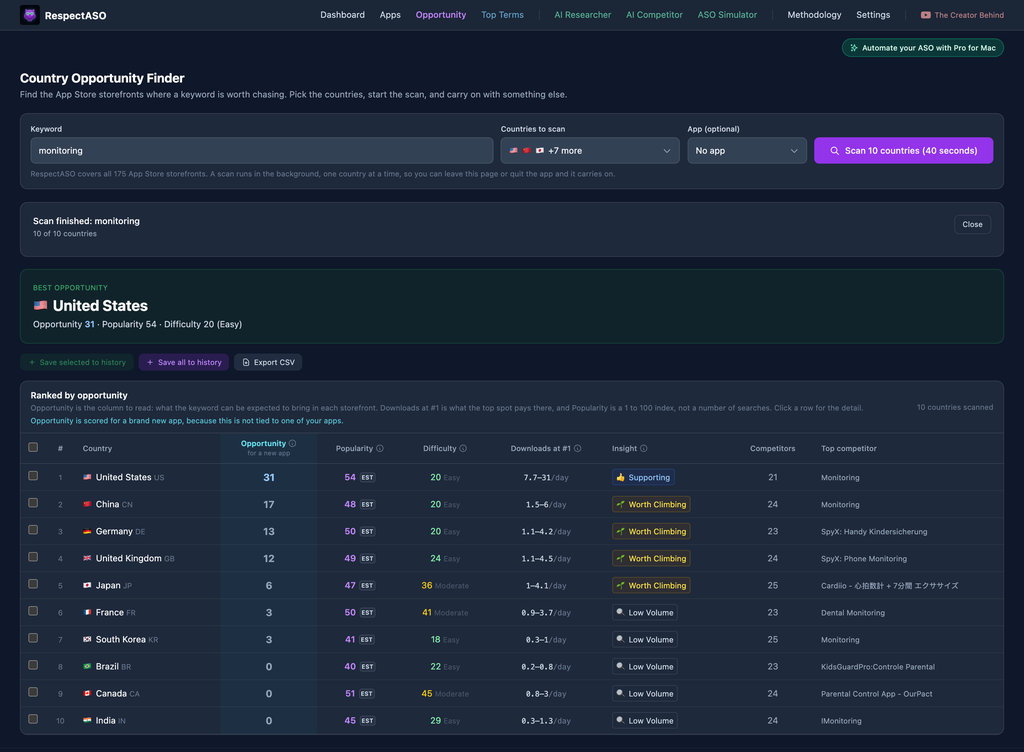
Build your free ASO workflow around real keyword research
Download RespectASO to research App Store keywords, compare countries, analyze competitors, and export your shortlist before you decide whether Pro AI workflows make sense for your app.