ASO Tool Comparison
TheTool Alternative for Indie iOS Developers: RespectASO vs TheTool
TheTool now redirects to App Radar. Looking for a TheTool alternative? See what RespectASO gives you for iOS keyword research on your Mac.
What Was TheTool?
TheTool was a cloud-based ASO platform that provided keyword research, app analytics, and optimization tools for iOS and Android developers. It operated at thetool.io and was known as a budget-friendly option in the ASO tools market.
TheTool's site now redirects to App Radar. The thetool.io domain redirects to appradar.com. If you were a TheTool user or are researching "TheTool alternative," this page explains how RespectASO compares to the hosted ASO model that TheTool represented.
Why This Page Exists
Developers searching for "TheTool alternative" or "TheTool ASO" may not yet know that thetool.io now redirects to appradar.com. With RespectASO, you get a local-first iOS keyword research workflow with an open-source core, transparent scoring, and Pro agentic AI workflows.
TheTool's Model vs. RespectASO
TheTool operated as a subscription-based web service accessed through a browser. Its site now redirects to App Radar.
RespectASO takes a different approach built around local research ownership and open-source core tooling.
| Aspect | TheTool (now App Radar) | RespectASO |
|---|---|---|
| Status | thetool.io redirects to appradar.com | Actively developed, independent |
| Architecture | Browser-based web application | Desktop app (runs locally on your Mac) |
| Data ownership | Hosted workspace | All data stays on your machine, always |
| Product continuity | Site now redirects to App Radar | Open-source: the code is yours regardless of company |
| Pricing model | Recurring subscription | Free open-source + optional Pro licence for 3 months or a year (see pricing) |
| Open source | Commercial platform | AGPL-3.0 (free edition) |
Why Portable ASO Workflows Matter
When a product changes direction, local data, exportable files, and open-source tooling make any transition easier. That's part of why we built RespectASO the way we did.
RespectASO keeps your ASO work portable in two ways:
- Local data: Your keyword research, competitor analyses, and historical data live on your Mac. Nothing to migrate later.
- Open source: The free edition's source code is publicly available under the AGPL-3.0 license, so the core software keeps running regardless of what we do as a company.
What Former TheTool Users Get with RespectASO
If you used TheTool for iOS keyword research, you can keep the core ASO research workflow and go deeper with RespectASO:
- Keyword popularity and difficulty scoring from App Store/iTunes Search-derived research
- Opportunity scoring that combines popularity, difficulty, and competitive factors
- The Country Opportunity Finder for discovering untapped markets
- Apple's official search-popularity data, updated weekly through your own free Apple Ads key
- AI Niche Researcher, AI Competitor Analyzer, ASO Score Simulator, Top Search Terms, and a 32-tool MCP server in Pro
RespectASO's Advanced Strengths
Recent RespectASO releases added a set of capabilities that matter in any ASO tool comparison:
- Every App Store storefront: keyword research, difficulty, competitors and the Country Opportunity Finder work in all 175 storefronts Apple operates, not a shortlist of the big ones. The supported countries page lists them, and says where Apple publishes search popularity and where Apple offers an App Store listing language, so you know what a market will give you before you spend time on it.
- Official Apple popularity data (free): connect a free Apple Ads API key once (no campaigns, no ad spend) and RespectASO shows Apple's official weekly search popularity from the Apple Ads Platform API. You choose whether Apple's values or the built-in estimate power your scores, and the key stays on your computer. How the two sources work.
- A calibrated estimate: where Apple publishes no popularity, the built-in estimate fills in, fitted against thousands of Apple's official search-popularity values across several countries, so it speaks the same scale as Apple's own numbers.
- A measured rank, for your app: the opportunity score is built on where apps like yours actually land in the search results, measured on 309 real App Store searches in six countries, and it is scored for the app you track the keyword for, from its own ratings in each storefront. Under every score RespectASO shows the rank it assumed and why. How the score is worked out.
- AI that scores for your app (Pro): the AI Niche Researcher and the AI Competitor Analyzer can score every keyword for one of your own apps, from its ratings and the ranks the Keywords page measured for it. The ASO Score Simulator says when a low score comes from the app's missing ratings rather than its metadata, shows what the same metadata would score with 100 ratings, and tells you how each refined version's estimated search downloads compare with your current metadata. How the AI features work.
- Whole keyword lists in one search (Pro): paste up to 1,000 keywords and RespectASO researches them across up to 5 storefronts in the background. Switch tabs or quit the app, and it continues where it left off, with the results streaming into Tracked Keywords as they come in. The free edition takes 3 keywords per search.
- Top Search Terms (Pro): browse Apple's official most-searched terms per storefront and category: up to 500 terms across 15 categories with rank, popularity, weekly climbers and fallers, and brand-new entries. Track any term or send it to the AI Researcher in one click.
- Rival Tracker (Pro): follow your app against up to 10 rivals every day in up to 3 countries: ranks on your keywords with 13 months of history, ratings side by side, each rival's App Store updates, and a weekly AI summary of what their users complain about. How Rival Tracker works.
- A first-party MCP server (Pro): all 32 ASO tools are usable from Claude Desktop, Claude Code, Cursor, VS Code, and other MCP clients: your assistant scores keywords, runs opportunity scans, and drives the AI workflows against your own local research data. MCP setup.
- Any AI model, any provider (Pro): type any model ID from OpenAI, Anthropic, Google Gemini, or OpenRouter. The in-app test is the only gate, so new models work the day they ship. Connect any other OpenAI-compatible service (OpenCode Zen, Groq, and similar) as a custom endpoint with its address, your key, and a model ID. Or skip the cloud entirely and run a local model via Ollama or LM Studio with no per-query cost.
- Source-aware AI reports (Pro): every AI analysis states which popularity source produced its numbers, and saved reports freeze their figures so the text and the numbers always match. See everything in Pro.
Where the Hours Go
Manual keyword research is slow in a very specific way: checking one keyword in one storefront means an App Store search, a scroll through the results, and notes on the top apps. That is a few minutes every time, multiplied by every keyword and every country you care about. RespectASO automates exactly that arithmetic. With Pro, one search takes a list of up to 1,000 keywords across 5 storefronts and works through it in the background (you can switch tabs or quit, and it continues where it left off), and the Country Opportunity Finder checks a keyword across the storefronts you pick, which would otherwise cost an afternoon of storefront-by-storefront checking.
The rest of the routine runs itself: tracked keywords update by themselves every day, Apple's official popularity arrives every week with nothing to click, and bulk actions apply to your whole selection even across pages. With Pro, Rival Tracker checks where your app and up to 10 rivals rank on every followed keyword each day, records their ratings and App Store updates, and collects their newest reviews, a check that would otherwise mean opening every rival's page every morning. With Pro, the AI Niche Researcher turns one seed keyword into 50-70 scored candidates plus ready-to-test metadata in a single run, and through MCP your AI assistant runs the same research mid-conversation, with no app switching and no copy-pasting of scores.
When RespectASO Is the Better Fit
- You want a local-first ASO tool with portable, exportable data
- You're focused on iOS and want App Store/iTunes Search-derived keyword research
- You prefer local-first competitive research with no RespectASO account or telemetry for free core workflows
- You want an open-source tool you can inspect, verify, and trust
- You want Pro agentic AI workflows for niche research, competitor analysis, and metadata simulation
When App Radar (TheTool's Successor) Is the Better Fit
- You need cross-platform ASO for both iOS and Android
- You want to edit app store listings directly from your ASO tool
- You need browser-based access from any device
- You want automated metadata management across multiple apps
The RespectASO Direction
If TheTool's redirect to App Radar has you reconsidering your ASO tool choices, RespectASO gives you local-first iOS keyword research, open-source core tooling, transparent scoring, country opportunity discovery, and Pro agentic AI workflows that help turn research into metadata decisions. For detailed comparisons with active ASO platforms, see our pages on App Radar (TheTool's successor), Asodesk, or AppTweak.
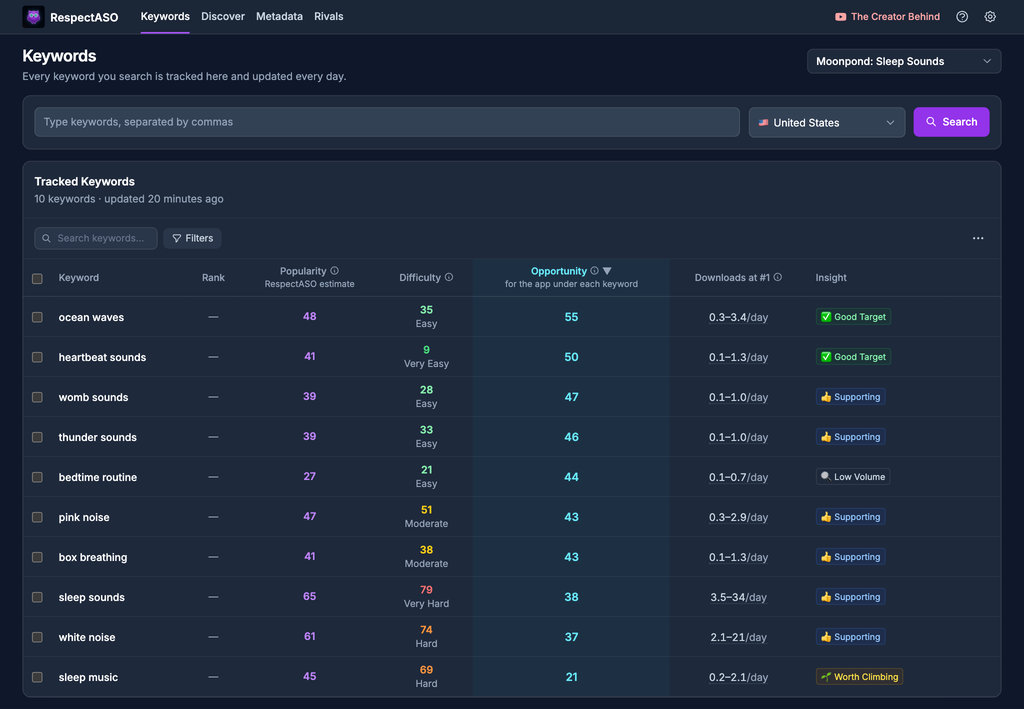
Keyword research in RespectASO, free and open source
Try RespectASO Free
Download the free, open-source edition and see how it compares for yourself.