RespectASO Pro
AI ASO Tool for iOS Keyword Research and Metadata
Give it a keyword, a rival's App Store link or your current metadata. The AI drafts keywords and metadata, and RespectASO scores every keyword.
RespectASO Pro puts AI to work on the slow parts of App Store keyword research: finding candidates in a niche, reading what a rival targets, and writing a title, subtitle and keyword field that fit. The AI drafts. RespectASO scores every keyword it suggests with the same popularity, difficulty and Opportunity numbers as the free Keywords page, so you judge its ideas on the numbers, not on how sure the AI sounds.
It runs in the Mac app, with the AI provider you choose or a model on your own Mac, and inside Claude, Cursor and other AI assistants through MCP.
Research a niche from one keyword
The AI Niche Researcher takes a keyword, a country and, if you like, an App Store category. It comes back with:
- Keyword candidates for the niche, each with popularity, difficulty, Opportunity and Downloads at #1
- Three titles, three subtitles and a keyword field built from the best of them
- The ten apps you would compete with, and an app brief: the problem, the audience and the gaps those apps leave
You choose whose chances it scores: a brand new app, or one of your own apps from its ratings in that country. A new app and an established one should target different keywords, and the recommendations change with that choice.
See what a rival's listing targets
Paste a competitor's App Store link into the AI Competitor Analyzer. It pulls the keywords out of the listing, scores each one, shows the rival's rank where it has one, and drafts metadata that goes after the keywords you can win instead of copying theirs. A niche map shows the other apps that keep turning up across those searches.
Score your metadata before you submit
Type your title, subtitle and keyword field into the ASO Score Simulator and pick your app. You get an ASO Readiness score (0 to 100) for how much search traffic those keywords can bring your app at the ranks it can reach, plus suggested titles, subtitles and a keyword field to try. Each refined version is compared with your current metadata. Localize mode writes a new title, subtitle and keyword field in another storefront's language, built from the phrases people there search for rather than a translation of yours.
Hear what your rivals' users complain about
Once a week, the Rival Tracker has your AI provider sum up the newest one to three star reviews of the apps you follow. That is the list of complaints your app could answer, in your listing and in your next release.
Every suggestion fits Apple's limits
Language models are loose with character counts. RespectASO is not: every title, subtitle and keyword field it suggests is checked against Apple's limits (30, 30 and 100 characters, no word repeated across fields) and corrected before you see it. Whether it says the right thing about your app stays your call.
Use it from Claude, Cursor and other AI assistants
Pro includes an MCP server with 32 ASO tools. Connect it to Claude Desktop, Cursor, VS Code or any other assistant that speaks MCP, and ask in plain words: "find the best countries for my fitness app", "what does this rival rank for?", "check this keyword field". Your assistant does the research through RespectASO on your Mac. The MCP setup guide walks you through it.
Your AI provider, or a model on your Mac
Pro uses your own key with OpenAI, Anthropic, Google Gemini or OpenRouter, or any OpenAI-compatible service you connect. Your keywords go straight from your Mac to the provider you choose, never through a server of ours. Prefer no key at all? Local AI runs the AI tabs on a model on your own Mac through Ollama or LM Studio, with no per-query cost. The App Store data a run scores still comes from Apple.
The AI drafts, you decide
A language model can suggest a keyword that sounds right and brings nothing. That is why nothing it suggests comes without numbers: every keyword carries the same tag as on the Keywords page (Sweet Spot, Good Target, Supporting, Worth Climbing or Low Volume), and you keep the ones that earn their characters. The keyword research guide explains how to read them.
How it fits your week
- Discover: run the AI Niche Researcher on your main keyword.
- Compare: run the AI Competitor Analyzer on two or three apps that rank above you.
- Check markets: put the best keywords through the Country Opportunity Finder.
- Write and score: test your new metadata in the ASO Score Simulator, then ship it and track the ranks.
Get started
- Download RespectASO. Keyword research is free.
- Get a Pro licence on the pricing page.
- Choose your AI: add a key (the API key guide shows how) or set up Local AI.
- Open the AI tabs. The AI features docs cover each one.
Compare AI ASO tools
- RespectASO vs AppTweak: a broad SaaS platform and a local-first Mac app
- RespectASO vs Sensor Tower: enterprise market intelligence and focused keyword research
- RespectASO vs MobileAction: a growth platform and focused keyword research
- See all comparison pages.
Further reading
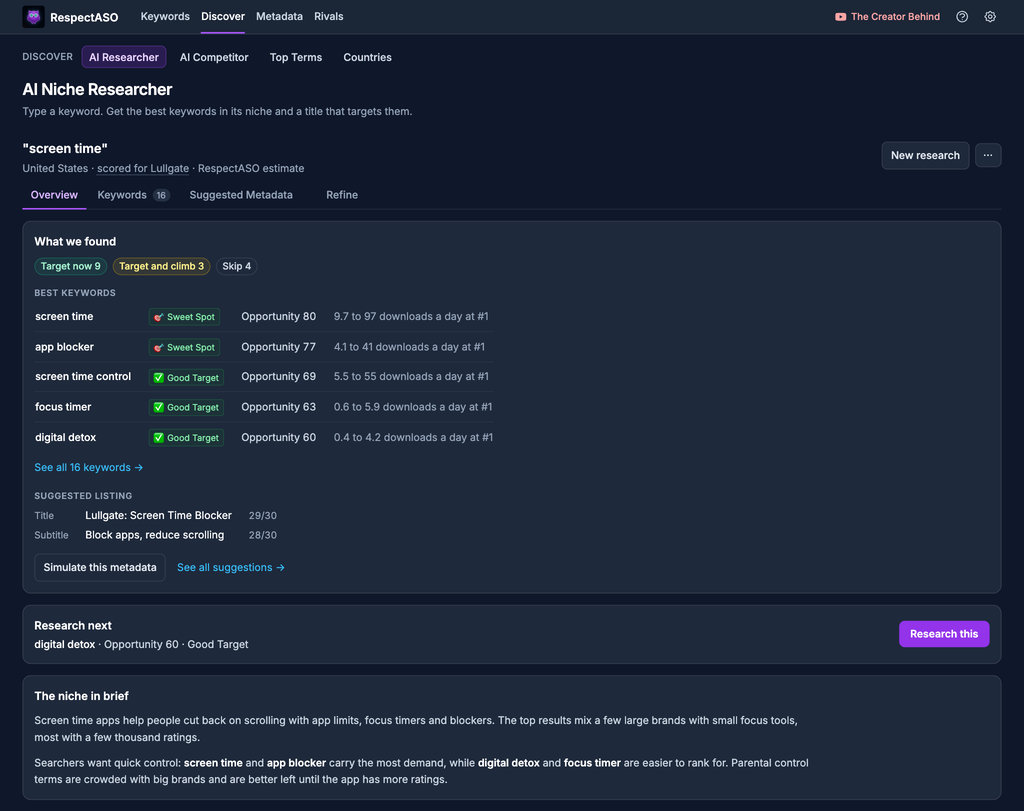
AI Niche Researcher: scored keywords and a ready to use title and subtitle from one keyword
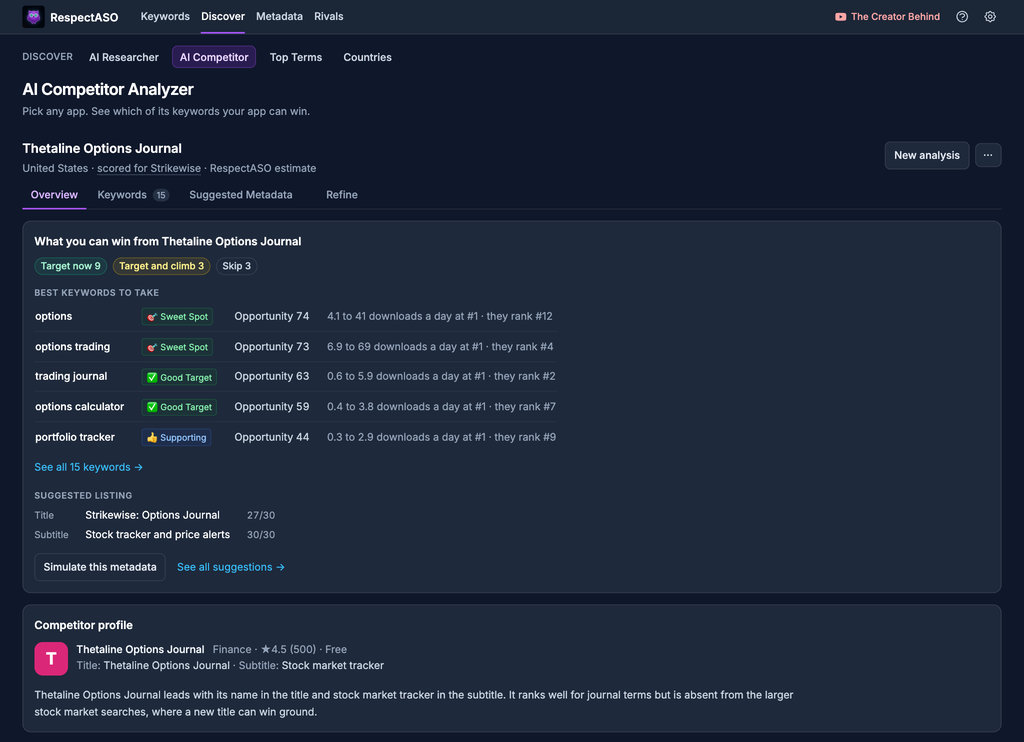
AI Competitor Analyzer: the keywords in any competitor's listing, with its rank for each
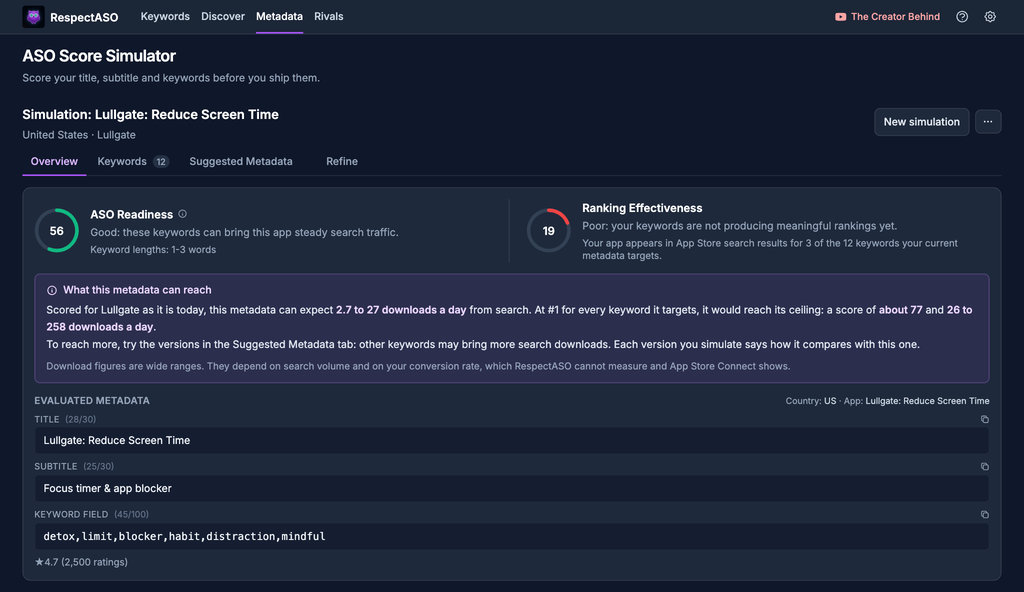
ASO Score Simulator: score a title, subtitle and keyword field before you submit them
Try the AI tabs on your own app
Start with the free edition, then add Pro when you want the AI tabs and MCP.