Let AI do the ASO legwork,
you make the calls
Agentic AI for ASO: Pro writes your metadata and refines it until every field fits Apple's limits.
Powered by OpenAI, Anthropic Claude, Google Gemini, or OpenRouter using your own keys, any other OpenAI-compatible service as a custom endpoint, or Local AI running on your own Mac with no per-query cost

Engine
Engine
The agentic engine researching and scoring keywords autonomously
1 keyword
Turns one seed into a complete niche strategy
1 click
Full competitor strategy breakdown
0–100
Instant ASO score with actionable fixes
Every day
Your app against up to 10 rivals: ranks, updates and ratings
AI Niche Researcher
Enter a keyword and, if you like, your app's category. RespectASO automatically researches the competitive landscape, discovers keyword opportunities, and generates a complete ASO strategy, including optimized title, subtitle, and keyword field.
Enter your keyword
e.g., "fitness tracker" in the Health category, scored for one of your apps or for a brand new one
RespectASO does the work
Automatically analyzes competitors, keyword gaps, market trends
Get a ready-to-use strategy
Optimized metadata within App Store character limits
Output respects Apple's field limits: title ≤30 chars, subtitle ≤30 chars, keyword field ≤100 chars. No duplicated keywords.
AI Niche Researcher
FitPulse: Workout Tracker
Daily Steps & Gym Planner
fitness,
Rival Tracker
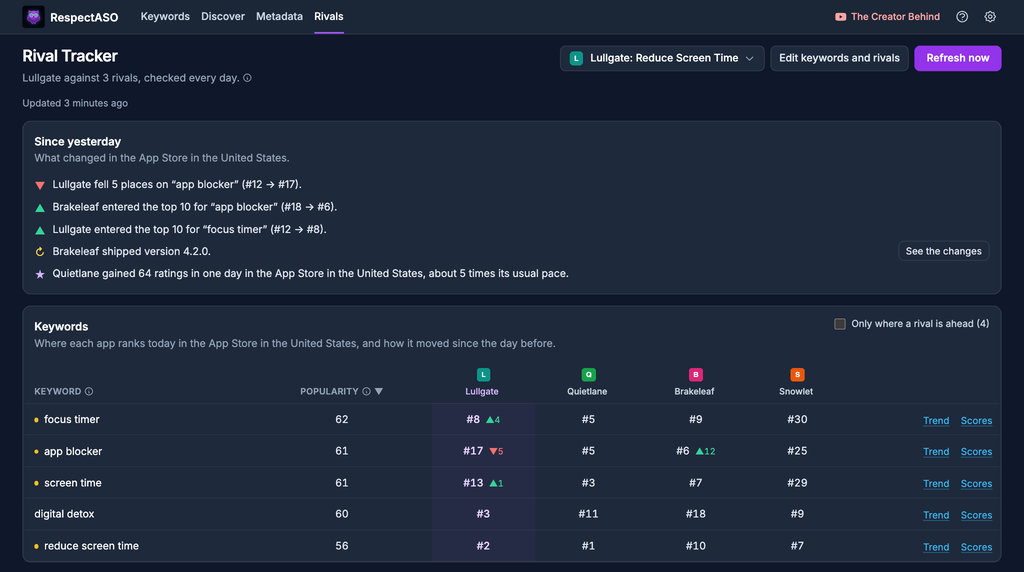
See what your rivals did since yesterday. Follow your app against up to 10 rivals in up to 3 countries, and every day RespectASO tells you in plain words who passed whom on your keywords, who shipped an update and whose ratings jumped.
- Every keyword you follow, with your rank and each rival's side by side and the change since the day before
- A Since yesterday card in plain words: who entered the top 10, who fell, who shipped an update, whose ratings jumped, and a Mac notification if you want one
- A trend chart for every keyword, up to 13 months back: point at a day to see every app's rank
- What rivals' users complain about, summed up weekly by your own AI provider, with what your app could answer
- Keyword ideas from your title, subtitle and keyword field, each scored with App Store data
AI Competitor Analyzer
Long-tail focus with brand terms
Strong subtitle KW, title-subtitle synergy
Keyword field has 12 unused chars
AI Competitor Analyzer
Paste any App Store URL and RespectASO automatically reverse-engineers their keyword strategy. It identifies target keywords, evaluates metadata strengths and weaknesses, and shows you exactly how to outcompete them.
- Analyzes title, subtitle, keyword field strategy
- Identifies keyword gaps you can exploit
- Generates counter-strategies for each competitor
- Scores every keyword for one of your own apps, from its ratings and the ranks the Keywords page measured
ASO Score Simulator
Score the metadata you plan to ship, or hand it over and let the AI generate a brand-new localized version for any App Store storefront in the world. Two modes, one tab: Score evaluates your exact title, subtitle, and keyword field against the live App Store; Localize uses your metadata as a source and writes a native target-language version optimized for downloads, never machine translation.
- ASO Readiness Score 0–100 with keyword-by-keyword breakdown
- Scored for your app as it stands today: when a low score comes from missing ratings, it says so and shows what the same metadata would score with 100 ratings, and every version shows its ceiling at #1 for every keyword it targets
- Each refinement says how its estimated search downloads compare with your current metadata
- Localize to 30+ App Store storefronts: French, Spanish, German, Japanese, Korean, Chinese, Hindi, Arabic and more
- Native search phrases real local users actually type, including regional variants like en-US → en-GB ("soccer" → "football")
- One-click copy on every field, ready to paste into App Store Connect
ASO Score
Top Search Terms
Browse what people actually search on the App Store: Apple's official most-searched terms per storefront and category, updated weekly through your Apple Ads connection. Spot demand, watch it move week over week, and act on it without leaving the tab.
- Up to 500 terms per category across 15 categories, with category rank, popularity, and Apple's 1–5 tier
- Climbing, falling, and brand-new terms every week: demand shifts you'd otherwise miss
- Per-term trend sparklines with a full week-by-week history chart one click away
- Track any term for the app you choose, or hand it to the AI Niche Researcher in one click
Top Search Terms
🇺🇸 FinanceUse Pro features from your AI assistant
All 32 ASO tools, including every Pro feature above, are accessible from Claude Desktop, Cursor, VS Code, and other MCP-compatible AI assistants. Do your entire ASO workflow through natural conversation, without opening the GUI.
- Ask your AI to research keywords and get 50+ scored keywords with metadata suggestions
- Reverse-engineer any competitor: paste an App Store URL, get their full keyword strategy
- Validate and simulate metadata, with instant ASO scores and AI-powered suggestions
- Iterative refinement: give feedback and your AI adjusts, remembering the whole conversation
All 32 MCP tools are included with your Pro license, from keyword scoring to the full AI research workflows.
AI Assistant
You:
"Research 'meditation app' for the US market"
RespectASO MCP:
Researching... Found 52 keyword opportunities. Top recommendations: "guided meditation", "mindfulness", "sleep sounds"...
You:
"Focus on sleep-related keywords and generate metadata"
RespectASO MCP:
Refining with sleep focus... Generated title, subtitle, and keyword field. All 9 constraints pass. ✓
The Engine Behind Pro
How Agentic ASO works
Every Pro feature is powered by the same agentic engine: a self-correcting loop that doesn't stop until your metadata is valid.
Generate
The AI generates optimized metadata using your chosen provider (OpenAI, Anthropic, Google Gemini, OpenRouter, any OpenAI-compatible service as a custom endpoint, or Local AI on your own Mac) and shapes it to fit every App Store field.
Validate
Every output is checked against 9 hard constraints: character limits, keyword duplication, word overlap between title and subtitle, keyword field format, and more. Only metadata that passes every rule reaches you.
Self-correct
If any constraint is violated, the engine tells the AI exactly what went wrong and asks it to fix it. This happens automatically, for up to 5 refinement rounds, until every rule passes.
Fallback
If the AI still has issues after 5 rounds, a programmatic fallback automatically fixes remaining violations by truncating fields, splitting multi-word phrases, and removing duplicates. You always get valid metadata.
9 hard constraints, enforced every time
Title ≤ 30 chars
Apple's hard limit
Subtitle ≤ 30 chars
Apple's hard limit
Keywords ≤ 100 chars
Apple's hard limit
No cross-field duplication
Keywords not in title/subtitle
No title-subtitle overlap
Subtitle uses unique words
Single words only
Apple recombines automatically
Proper comma formatting
No spaces after commas
All fields non-empty
No blank metadata fields
≥ 90 chars used
Maximize keyword coverage
Frequently asked questions
What is agentic ASO?
How is this different from other AI ASO tools?
Which LLM providers are supported?
Can I run the AI features locally?
What happens if the AI still makes mistakes?
Do I need a subscription?
What does Rival Tracker watch?
Your AI, your choice
Use your own key with a cloud provider (we never see or store it), or run a model on your own Mac. Type any model ID, new ones included, and a built-in test checks it works.
OpenAI
Any GPT model you pick
Anthropic
Any Claude model you pick
Google Gemini
Any Gemini model you pick
OpenRouter
Hundreds of models through one key, including budget options like DeepSeek.
Custom endpoint
Any other OpenAI-compatible service, such as OpenCode Zen or Groq: enter its address, key and model ID.
Local AI
Your own Mac · Ollama or LM Studio
Local AI
Run it all on your Mac with no AI bill
Point RespectASO at a model running locally through Ollama or LM Studio. The same agentic workflows, now fully on-device.
No per-query cost. No API key, no metering: run as many analyses as you want.
Total privacy. Your prompts never leave your Mac.
No cloud round-trip. The model answers on your Mac; the App Store data a run scores still comes from Apple.
Your model, your choice. Detect installed models and confirm readiness with one-click Test.
Speed depends on your Mac, and larger models give better suggestions. Local AI needs the macOS app. See the setup guide →
Ready for ASO that self-corrects?
Stop manually fixing AI output. Get Pro and let the agentic engine handle the constraints.
Start Automating Your ASO