Category Guide
App Store Optimization for AI Apps Apps: Strategy Guide
ASO strategy guide for AI apps on iOS: use-case keyword research for assistants, chat, image generation and productivity AI in a fast-moving category.
What "AI app" means on the App Store
"AI Apps" isn't a literal App Store category. Apple sorts your app into one of its primary categories (Productivity, Utilities, Photo & Video, Education, and so on) based on what it does. The AI label is a market segment, not a directory entry. That matters for ASO, because users search by what they want done ("AI image generator", "AI writing assistant", "chatbot"), not by category. Your job is to win those use-case searches inside whichever real category your app lives in.
This page is a workflow for AI apps regardless of the category Apple assigned. The keyword patterns, metadata structure, and competitive considerations apply whether you're an AI assistant in Productivity, an AI image generator in Photo & Video, or an AI tutor in Education.
Pick the right primary category for an AI app
The category Apple lists you in shapes who finds you in browse and which competitors you're benchmarked against in charts. Pick by what the app actually does, not by what's most fashionable.
| What your AI app does | Primary category to consider | Related guide |
|---|---|---|
| Conversational assistant, chatbot, AI writing | Productivity | Productivity ASO guide |
| AI image generation, photo editing, video AI | Photo & Video | Photo & Video ASO guide |
| AI utility (translation, voice, OCR, summarisation tools) | Utilities | Utilities ASO guide |
| AI tutor, study tools, language learning AI | Education | Education ASO guide |
| AI fitness, health coach, wellness AI | Health & Fitness | Health & Fitness ASO guide |
| AI lifestyle, dating, journaling, mood | Lifestyle | Lifestyle ASO guide |
How users actually search for AI apps
The hard part of ASO for AI apps isn't proving your app is AI. It's matching how users phrase the job they want done. The same user might search any of these forms in the same week:
- Brand-led: "ChatGPT app", "Claude app", "Midjourney app". Users searching by name want that app; aim at the related long tails instead.
- Capability-led: "AI image generator", "AI writing assistant", "AI translator". The richest target zone for most AI apps.
- Job-led: "rewrite my essay", "remove background from photo", "summarize pdf". No "AI" in the query at all: users describing the outcome.
- Comparison-led: "ChatGPT alternative", "AI better than Bing". High intent but legally and policy-sensitive in metadata.
The mix of capability-led and job-led terms is usually where AI apps win. Brand-led searches belong to the named app; comparison-led can attract review and policy attention; capability and job searches are evergreen and open to any app that does the job.
Keyword patterns for AI apps
| Keyword type | Example | Strategy |
|---|---|---|
| Capability + AI | "AI photo editor", "AI resume builder" | Pair with a niche to say exactly what the app does. |
| Job-led, no AI | "summarize pdf", "rewrite email", "remove background" | High intent. Compare them with the AI-prefixed versions in the measured table. |
| Niche capability | "AI cover letter writer", "AI meal planner" | A specific job for a specific need: where to look for sweet-spot keywords. |
| Audience + capability | "AI for teachers", "AI for students" | Good for vertical AI apps. Low duplication risk against generalist tools. |
| Brand alternative | "ChatGPT alternative" | High intent, policy-sensitive. Be careful with metadata claims. |
| "Free" / "no signup" modifiers | "free AI image generator" | Only use if your app actually offers a usable free tier. |
24 AI app keywords, measured in the US App Store
Measured by RespectASO on 6 October 2026. Popularity is RespectASO's estimate of how often a keyword is searched compared with others, from 1 to 100. Difficulty, from 1 to 100, says how hard the apps already on top are to pass. "In top 10 names" counts the top ten apps with the keyword in their name. How the numbers work.
| Keyword | Popularity | Difficulty | In top 10 names |
|---|---|---|---|
| Head terms | |||
| ai | 78 | 85 Very Hard | 6 of 10 |
| ai app | 56 | 66 Hard | 0 of 10 |
| ai apps | 57 | 66 Hard | 0 of 10 |
| chatbot | 72 | 67 Hard | 2 of 10 |
| ai assistant | 70 | 74 Hard | 3 of 10 |
| ai image generator | 48 | 68 Hard | 3 of 10 |
| Features and sub-genres | |||
| ai writing assistant | 39 | 53 Moderate | 2 of 10 |
| ai translator | 65 | 66 Hard | 7 of 10 |
| ai photo editor | 70 | 80 Very Hard | 7 of 10 |
| ai resume builder | 41 | 31 Easy | 6 of 10 |
| remove background | 54 | 72 Hard | 4 of 10 |
| summarize pdf | 31 | 13 Very Easy | 2 of 10 |
| Audiences and uses | |||
| ai for students | 42 | 55 Moderate | 1 of 10 |
| ai for teachers | 50 | 39 Moderate | 3 of 10 |
| ai meal planner | 28 | 42 Moderate | 5 of 10 |
| rewrite email | 42 | 52 Moderate | 0 of 10 |
| rewrite my essay | 28 | 16 Easy | 0 of 10 |
| ai homework helper | 52 | 66 Hard | 4 of 10 |
| Long-tail phrases | |||
| free ai image generator | 39 | 61 Hard | 0 of 10 |
| ai cover letter writer | 28 | 22 Easy | 1 of 10 |
| ai writing coach | 36 | 15 Very Easy | 1 of 10 |
| remove background from photo | 35 | 57 Hard | 0 of 10 |
| ai chat no signup | 32 | 46 Moderate | 0 of 10 |
| ai photo enhancer free | 38 | 46 Moderate | 0 of 10 |
Difficulty here runs from 13 for "summarize pdf" to 85 for "ai". 4 of the 24 keywords score 70 or more, and 4 score under 30. The long-tail phrases have a median difficulty of 46, against 67 for the head terms. The highest popularity among keywords under difficulty 50 belongs to "ai for teachers": 50, at difficulty 39.
To see what these keywords would bring your own app, and to measure them in any of the 175 storefronts, run them in RespectASO, free on your Mac.
Metadata structure for AI apps
The fast-moving nature of AI means metadata that name-checks today's hot model ages in months. Build a structure that holds up regardless of which model you're using under the hood.
- Title (30 characters): brand + the core capability. Example: "Penwise: AI Writing Coach".
- Subtitle (30 characters): the job done, in plain language. Example: "Edit, rewrite, and translate".
- Keyword field (100 characters): non-duplicating capability terms, job-led terms, and one or two competitor-alternative terms where appropriate. No spaces after commas.
Use the title counter, subtitle counter, and keyword field counter to fit each field without wasting characters.
Avoid baking specific model names ("GPT-4", "Claude 3.5") into the title or subtitle. You'll be stuck rewriting metadata every release cycle and you risk policy issues if you imply an unaffiliated relationship with a model provider.
Common mistakes in AI app ASO
- Stuffing "AI" everywhere. Diminishing returns. Apple already indexes your category, and "AI" alone is the first term everyone tries; its row in the measured table shows why. Pair AI with a capability or audience.
- Naming a model in the listing. "Powered by GPT-4" copy ages fast and can attract policy review if it implies endorsement.
- Targeting "ChatGPT" as your main keyword. Brand keywords for a competitor convert poorly and can attract removal requests.
- Vague "do anything" positioning. Generalist AI apps lose to specialists in specific use cases. The keyword is the product positioning.
- Skipping the job-led keywords. "AI writing assistant" may be obvious, but "rewrite my essay" gets searched too; the measured table shows both.
- Not localizing capability terms. The English keyword "AI image generator" doesn't always translate one-to-one. Run candidates through the Country Opportunity Finder before localizing.
How RespectASO supports AI app ASO
- Use multi-keyword search to validate capability and job-led candidates ("AI photo editor", "remove background", "summarize pdf") for popularity and difficulty.
- Run the strongest terms through the Country Opportunity Finder: AI demand and competition vary sharply across storefronts.
- Use the Top 10 competitor data to study how the current AI category leaders wrote their listings, and which job-led keywords they cover or miss.
- Track ranks after launch. AI is a moving market; iterate on the keyword field every release cycle.
If you want to compress the research further, RespectASO Pro adds AI Niche Researcher to expand a seed capability into a full keyword niche, AI Competitor Analyzer to break down a top-ranking AI app's positioning, and the ASO Score Simulator to evaluate a draft AI metadata bundle before you ship.
FAQ
Is there an "AI" App Store category?
No. Apple sorts AI apps into existing primary categories like Productivity, Utilities, Photo & Video, Education, Health & Fitness, or Lifestyle based on what the app does. AI is a positioning term inside those categories, not a separate directory.
Can I claim my app uses GPT-4 or Claude in the listing?
Be careful. Naming a third-party model can imply endorsement and can age fast as you swap providers. Most AI apps describe what they do for the user ("AI writing coach") rather than which model is behind it. Check Apple's App Review Guidelines before making third-party claims in metadata.
Is "AI" as a keyword worth targeting?
The measured table above shows "ai" on its own next to paired phrases like "ai writing assistant" and "ai for teachers". Pick the pairing that describes what your app does for one specific job.
Where do I learn the rest of the workflow?
Start with the keyword research guide for the core ASO workflow, the AI ASO tool for using AI in the research itself, and the Localization Hub for international launches.
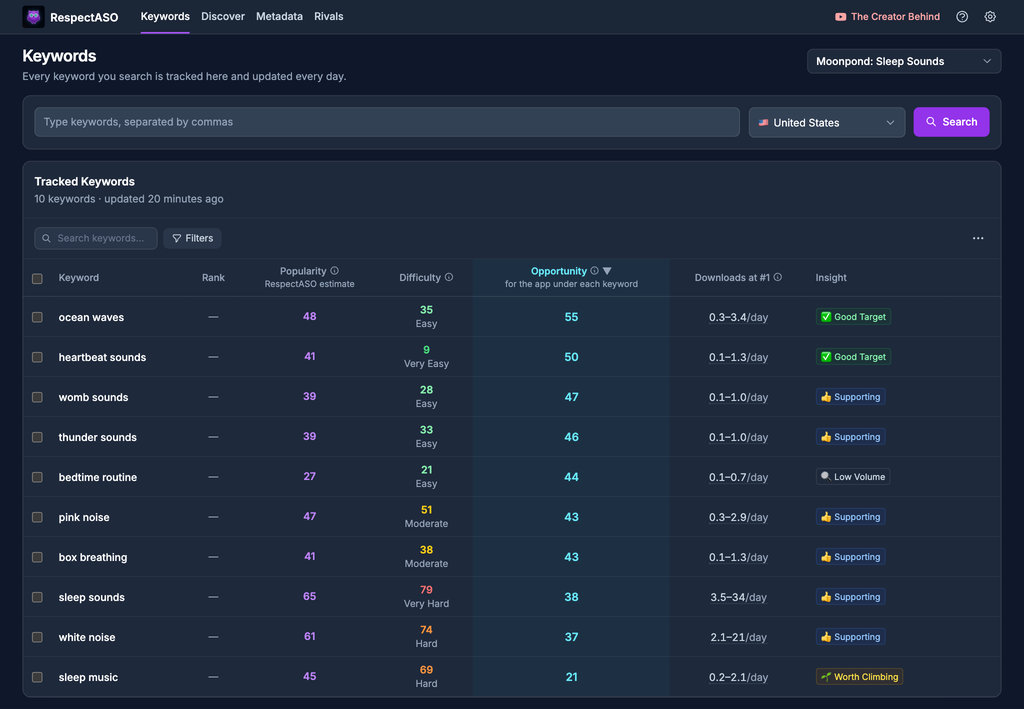
Keyword research in RespectASO: a score and a tag for every keyword
Optimize Your AI Apps App
Use RespectASO to research keywords and build a data-driven ASO strategy for AI Apps apps.