App Store Keyword Research
How to Find App Store Keywords for Your iOS App
A method you can run this week: build a seed list, score every keyword, keep the ones worth targeting and fit them into 160 characters of metadata.
Keyword research decides which searches your app can show up for. Pick terms that are too competitive and your app sits on page ten. Pick terms nobody types and it ranks first for nothing. What you want is the middle: keywords people really search for, where an app like yours can reach a rank that brings downloads.
Here is the method we use, one step at a time, with the numbers to read at each step. You can do it by hand in the App Store, or in RespectASO, our free keyword research tool for iOS, which works out the scores for you.
Step 1: Write a seed list of 20 to 30 words
Seeds are the plain words that describe your app. They come from three places:
- What your app does, in plain words. A habit tracker gives you: habit, tracker, routine, daily, streak, goals, reminder.
- How your users talk. Read your reviews and your competitors' reviews. People search for "to do list", not "task management application".
- What competitors put in their names. Search your main term on the App Store and read the titles and subtitles of the first ten apps. Words that keep coming back are words people search for.
Then combine roots with modifiers ("habit tracker widget", "daily routine planner") to find the longer phrases. Our free keyword combination generator does this in your browser.
Step 2: Check demand
Popularity runs from 1 to 100 and says how sought after a keyword is compared with others. It is not a count of searches. The same score means far fewer searches in a small storefront: by our estimate, a popularity of 43 is about 110 searches a day in the United States and a fraction of one in Antigua & Barbuda.
Apple publishes popularity for the most searched terms in each category, roughly those with 500 or more searches a week, and those start around 40. A keyword outside Apple's list sits below that line. That is useful in itself: most long phrases live there, and plenty of them are still worth having.
The question to answer at this step is simple: would the keyword bring anything even at #1? In RespectASO the Downloads at #1 column answers it. When even the top spot brings under one download a day, the keyword is tagged Low Volume and you can drop it.
Step 3: Check the competition
Difficulty runs from 1 to 100 and reads the apps already ranking for the keyword: how many ratings they have, how fast they gain more, how many put the keyword in their title, their star averages, how long they have been on the store and how many different publishers share the top ten.
By hand, search the keyword on the App Store and look at the first ten apps. If every one has tens of thousands of ratings and the keyword in its title, a new app will not get near them soon. If the top ten mixes big apps with small ones, or few of them use the keyword in their title, there is room.
What difficulty means for a new app was measured, not guessed. This is where a brand new app with the keyword in its title typically lands in real App Store results:
| Difficulty | Tier | Where a new app typically lands |
|---|---|---|
| 1-15 | Very Easy | #19 to #49 |
| 16-35 | Easy | #52 to #92 |
| 36-55 | Moderate | #94 to #102 |
| 56-75 | Hard | #102 to #123 |
| 76-90 | Very Hard | #123 to #135 |
| 91-100 | Extreme | #144 to past #200 |
Two lessons follow. A new app needs very easy keywords to reach the first page: on those, about one in five reaches the top 10, while at difficulty 90 fewer than one in a hundred do. And ratings change everything: an app with ratings of its own lands higher on every keyword, so a keyword that is out of reach today can be the right one next quarter.
Watch for brand keywords too. When the top result is the app whose publisher carries the keyword's name, Apple ranks it first on the name, and nobody else is getting that spot.
Step 4: Decide which rank you are playing for
Search results are steep. In our download estimates, #1 gets roughly 30% of the taps, the top five get most of them, and by #20 the share is below 0.1%. So the useful question is not "can I rank?" but "which tier can I reach, and is that tier worth it?"
- Top 5: where most of the downloads are. Realistic on easy keywords, or once your app has ratings.
- 6 to 10: still on screen without much scrolling, at a fraction of the taps.
- 11 to 20: modest, but on a low competition keyword even #15 can be worth the characters.
Step 5: Put demand and competition together
Popularity and difficulty pull in opposite directions, so judge them together. RespectASO turns the pair into one number, the Opportunity score (0 to 100): the downloads a keyword can be expected to bring your app, at the rank apps like yours land. 50 is about one download a day, and every tenfold change moves it 20 points. Every download figure is an estimate, shown as a range, because Apple publishes no search volumes or install data.
Every keyword then gets one tag, and the tag says what to do with it:
| Tag | What it means | What to do |
|---|---|---|
| Sweet Spot | 10 or more downloads a day at the rank you can expect | Target now. Title material. |
| Good Target | 1 to 10 downloads a day | Target now. |
| Supporting | One download every 10 days to 1 a day | Target as a supporting keyword. |
| Worth Climbing | Little today, but #1 brings a download a day or more | Target and climb: it pays more as your app gains ratings. |
| Low Volume | Even #1 brings under one download a day | Skip. |
Read difficulty beside the tag. A keyword with real demand and a low difficulty is what ASO guides call a hidden gem, and those are the first ones to claim.
Your shortlist at the end of this step: one or two keywords strong enough for the title, a few for the subtitle, and 10 to 20 single words for the keyword field.
Step 6: Spend your 160 characters
Apple indexes three fields, and they do not count the same. The title carries the most weight, then the subtitle, then the keyword field.
- Title, 30 characters: your app's name and your strongest keyword. Check it with the title character counter.
- Subtitle, 30 characters: the next keywords, written as a phrase a person can read. It shows in search results. Check it with the subtitle counter.
- Keyword field, 100 characters: hidden from users. Single words, separated by commas with no spaces. Check it with the keyword field counter.
Apple counts a word once across all three fields and can combine words from different fields into one search. So never repeat a word, and think in building blocks rather than finished phrases. An example for a meditation app:
- Title: "Serene: Meditation Timer"
- Subtitle: "Guided Breathing & Sleep"
- Keyword field: "mindfulness,
calm, relax, anxiety, stress, focus, zen, bedtime, morning, routine, peaceful, mental, health, wellness"
That is 21 different words, and searches like "calm meditation timer" or "guided breathing for sleep" are built from them. Words like "the", "and" and "for" rarely carry a search on their own, so they are rarely worth a character. Before you submit, the free metadata checker flags keyword field words that already sit in your title or subtitle.
Step 7: Check other storefronts
The same keyword has a different market in every country. A term that is crowded in the United States can be open in Brazil or South Korea, and every storefront ranks your app separately. The Country Opportunity Finder scores one keyword across the storefronts you pick, on the same Opportunity scale, so a small market only comes out ahead when it really pays more.
Apple offers listing languages for about forty languages, so a good result in a market can mean writing a listing in its language. The App Store localization guide covers that part.
Step 8: Track, wait, replace
- Ship the metadata with your next update.
- Give it a few weeks. Ranks move every day, so judge the trend, not one day.
- Replace what does not move. A keyword still nowhere after a month or two gives its characters to the next one on your shortlist.
- Look again with every update. As your app gains ratings, keywords tagged Worth Climbing become worth more.
RespectASO tracks every keyword you research and updates it every day while the app runs, so you can see what moved after each release.
Mistakes that cost you rankings
- Competitor brand names in your metadata. App Review Guideline 2.3.7 asks you not to pack metadata with trademarked terms or popular app names, and a person searching for a brand wants that brand.
- Your own app name in the keyword field. It is already in your title, so those characters are wasted.
- Betting everything on one keyword. Spread your characters across 15 to 20 keywords with different intent.
- Chasing volume and ignoring difficulty. Ranking around #50 on a very popular keyword brings close to nothing. A top three rank on a modest keyword can bring downloads every day.
Do it in RespectASO
Steps 2 to 5 are what the free Mac app does for every keyword you type: popularity (Apple's own where you connect Apple Ads, our calibrated estimate everywhere else), difficulty, the Opportunity score, Downloads at #1 and a tag, in all 175 storefronts. The free edition researches 3 keywords per search. Pro takes lists of up to 1,000 keywords and adds the AI tabs, which draft keyword lists and metadata and score them the same way.
The keyword research docs walk through the app, and the methodology explains every score.
Keyword research by category
Every category has its own keyword patterns. Our category guides go through them:
- Crowded: Games, Social Networking, Photo & Video, Entertainment. Specific features and genres win here.
- Room for specialists: Health & Fitness, Productivity, Education, Finance.
- Smaller and targeted: Weather, Food & Drink, Travel, Music, News, Sports.
See all category guides.
Terms used on this page
| Term | What it means |
|---|---|
| Keyword popularity | How sought after a keyword is compared with others (1-100) |
| Keyword difficulty | How strong the apps already ranking for it are (1-100) |
| Opportunity score | What the keyword is worth to your app at the rank you can expect |
| Long-tail keywords | Longer, more specific phrases that are easier to rank for |
| Search visibility | How often your app appears in search results |
| Competitor analysis | Reading what the apps you compete with target |
See the full ASO glossary.
Further reading
- Why is my app not ranking? A diagnostic guide for ranking problems.
- Why Apple Search Ads popularity is no longer enough on its own, and what we do instead.
- App Store localization: taking your keywords to 175 storefronts.
- AI ASO tool: keyword research with AI, in Pro.
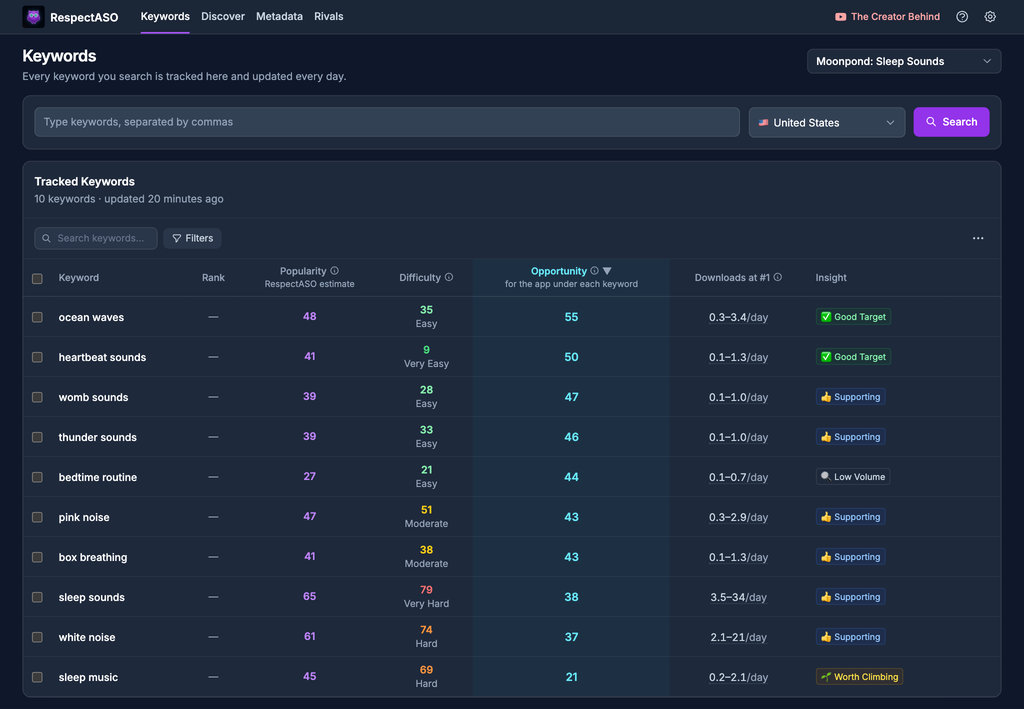
Keyword research in RespectASO: a score and a tag for every keyword
Put this strategy into practice
Download the macOS app and turn the guide into keyword research, market scanning, and competitor checks.