Features
Research smarter,
automate with Pro
Powerful keyword research, rank tracking, and competitor analysis for practical ASO work. When you're ready, Pro's AI automation handles the rest.
Find the right keywords, fast
The Keywords page is your main workspace. Search keywords, see how popular and competitive they are, discover who's ranking, and decide which keywords are worth targeting, all in one view.
- Search several keywords across up to 5 countries in one go
- Popularity and difficulty scores for every keyword
- Expand any keyword to see the competitor apps ranking for it
- Insight tags like Sweet Spot, Good Target and Worth Climbing say what to do with each keyword
- Group keywords with your own labels, like seasonal or high intent, then filter, sort and export to CSV
Your Tracked Apps
Track your app and monitor rankings
Add your iOS app (or any competitor) and see your ranking position for every keyword you research. Know exactly where you stand and whether your ASO changes are moving the needle.
- Add apps via App Store search, URL, or manual entry
- Your rank is highlighted in keyword search results
- Track ranking trends over time with trend indicators
Watch your rivals every day
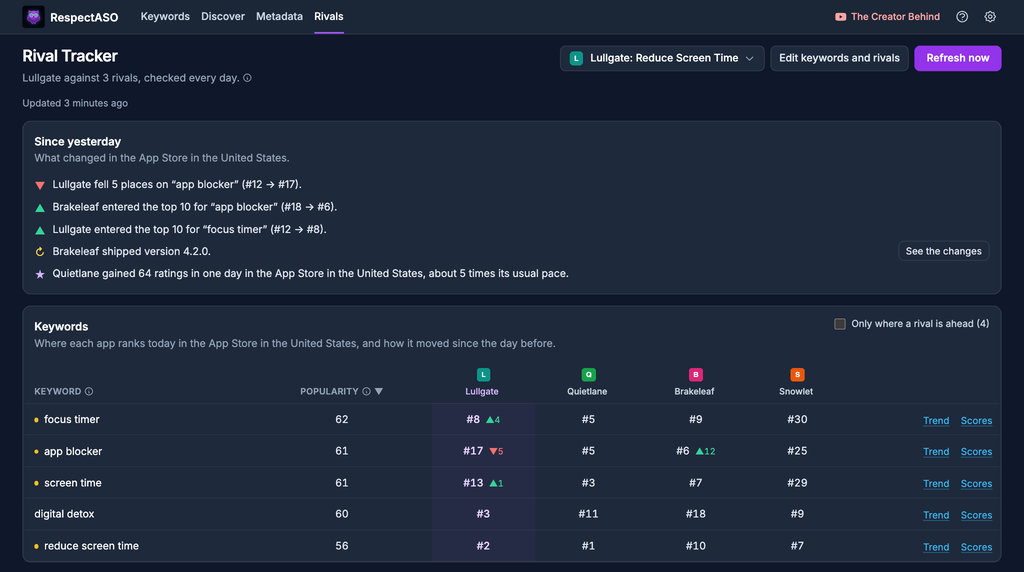
Follow your app against up to 10 rivals in up to 3 countries. Every day RespectASO tells you in plain words who passed whom on your keywords, who shipped an update and whose ratings jumped.
- Your rank and each rival's on the keywords you follow, with the change since the day before
- A Since yesterday card in plain words, and a Mac notification if you want one
- A trend chart for every keyword, up to 13 months back, with every app's rank on any day
- What rivals' users complain about, summed up weekly by your own AI provider
Discover untapped markets
Enter a keyword and scan all 175 App Store storefronts in one click. Instantly find which markets have the highest popularity with the lowest competition, so you can prioritize localization where it matters most.
- Scan one keyword across the storefronts you pick, in the background
- Opportunity score ranks each market by potential
- Add promising results to your keyword history with one click
- Make data-driven localization decisions
Best Opportunities
"fitness tracker"Difficulty Tiers
Know which battles to pick
Every keyword gets a popularity score and a difficulty score so you can quickly separate high-potential keywords from ones that aren't worth your time.
- Difficulty scored 1–100 with a clear 6-tier label so you know at a glance
- Popularity scored 1–100, calibrated against Apple's official search-popularity data
- Two popularity sources: RespectASO's calibrated estimate, or Apple's official values from the Apple Ads Platform API (free one-time key setup, updated weekly); you choose which powers your scores
- Download estimates for positions 1–20 so you can gauge traffic potential
- Fully transparent and open-source: read how it works
And so much more
Built by ASO practitioners, for ASO practitioners. Every feature solves a real problem.
175 App Store Storefronts
Research keywords across 175 storefronts including US, UK, Japan, Germany, Brazil, and more.
Auto-Refresh Rankings
Your rankings update by themselves every day while RespectASO runs, with nothing to set up.
CSV Export
Export your keyword research and rankings to CSV for use in spreadsheets or reports.
5 Insight Tags
Every keyword gets one tag that says what to do with it: Sweet Spot, Good Target, Supporting, Worth Climbing or Low Volume.
Trend Indicators
See how popularity, difficulty and your rank moved since the previous check, and Apple's weekly movement with Apple Ads.
Top Search Terms (Pro)
Apple's most-searched terms per storefront and category, with weekly movers. Track one or research it in one click.
Private by Design
Runs on your Mac with no account and no telemetry. Your research is stored there, where we never see it.
MCP Integration
Do ASO research by talking to Claude Desktop, Cursor or any AI assistant: 32 tools, included with Pro.
Local AI (Pro)
Run the Pro AI features on a model on your own Mac with Ollama or LM Studio: no API key, no AI bill.
Stop Doing ASO Manually
Automate your ASO with Pro
Pro's AI does the legwork of keyword research: it researches niches, analyzes competitors and drafts your metadata. Run it with your own cloud API key, or with Local AI on your own Mac at no per-query cost.