Category Guide
App Store Optimization for Kids Apps: Strategy Guide
ASO strategy guide for kids apps on iOS: Apple's Kids category rules, parent-driven keyword research, age-band targeting and metadata parents trust.
The Kids Category Landscape
Kids is the most rules-driven category on the App Store. Apple treats it as a special-status category with its own approval bar, age-band classification, and limits on what your app can do with ads, in-app purchases, and external links. The result is a smaller, safer, and far more parent-driven discovery surface than Games or Education. The keywords that win here aren't just searched by kids. They're searched by parents and teachers buying for kids, which changes the language entirely.
If you build for kids, your ASO work has to clear two bars: it has to be discoverable by parents who are screening for safety, and it has to comply with Apple's Kids category requirements before App Review will even publish you. This guide focuses on the keyword and metadata side; treat Apple's developer guidelines as the source of truth for the policy and compliance side.
Apple's Kids category rules that affect ASO
Before keyword work, get the structural pieces right. Apple's App Review Guidelines and the dedicated Kids section define what's required. Always verify against the current Apple docs, because the bar moves.
| Rule area | What it means for ASO |
|---|---|
| Age band | Pick 5 and under, 6-8, or 9-11. The band frames the language parents search for ("toddler" vs. "kids" vs. "tweens") and what the listing should look like. |
| Behavioural advertising / data collection | Restricted in the Kids category. Don't claim ad-supported revenue language in metadata if your model would conflict with Apple's rules. |
| External links and purchasing | Heavily restricted. Avoid metadata copy that implies linking out to external stores or sign-up flows. |
| Parental gating | Required for certain actions. Mention it in the listing as a trust signal where it's relevant ("parent-locked settings"). |
Who actually searches for Kids apps
The audience model in Kids is different from any other category. The buyer is almost never the user. Parents, grandparents, and teachers run the searches and tap "Get". That changes which keywords matter:
- Parents search for safety, age band, and outcome ("learning games for 4 year olds", "no ads kids", "preschool app").
- Teachers search for curriculum-adjacent terms ("phonics app for kindergarten", "math game grade 1").
- Grandparents and gift buyers search broad, descriptive terms ("toddler games", "ABC for kids").
- Kids themselves rarely run the search but heavily influence which results stick: the icon, screenshots, and subtitle matter for the in-store conversion.
Keyword patterns that work in Kids
Use these patterns as a starting point. Validate each candidate with multi-keyword search and the Country Opportunity Finder in RespectASO before locking your metadata.
| Keyword type | Example | Why it works for Kids |
|---|---|---|
| Age-band + outcome | "learning games 3 year old", "math game 2nd grade" | Parent search language: the age and the outcome in one phrase. |
| Skill + audience | "phonics for kindergarten", "math game grade 1" | Mirrors how parents and teachers describe the goal. |
| Safety / trust signal | "no ads kids", "offline games for kids" | Strong intent. Signals the buyer cares about a concrete property. |
| Character / theme | "dinosaur game", "coloring for kids" | Captures kid interests parents recognise. |
| Use-case | "car ride games for kids", "screen time learning" | Parent-mode keywords tied to an actual moment of use. |
Generic terms like "kids games" are what every kids app reaches for first. The measured table below puts them next to the age, skill and use-case versions, so you can see which pairing is worth your metadata before you look for the sweet-spot keywords for your own app.
24 kids app keywords, measured in the US App Store
Measured by RespectASO on 6 October 2026. Popularity is RespectASO's estimate of how often a keyword is searched compared with others, from 1 to 100. Difficulty, from 1 to 100, says how hard the apps already on top are to pass. "In top 10 names" counts the top ten apps with the keyword in their name. How the numbers work.
| Keyword | Popularity | Difficulty | In top 10 names |
|---|---|---|---|
| Head terms | |||
| kids games | 63 | 79 Very Hard | 3 of 10 |
| toddler games | 50 | 75 Hard | 4 of 10 |
| preschool games | 61 | 75 Hard | 2 of 10 |
| kids learning games | 47 | 78 Very Hard | 2 of 10 |
| phonics | 57 | 60 Hard | 7 of 10 |
| abc for kids | 43 | 34 Easy | 2 of 10 |
| Features and sub-genres | |||
| dinosaur game | 50 | 73 Hard | 0 of 10 |
| alphabet game | 45 | 51 Moderate | 2 of 10 |
| counting game | 41 | 54 Moderate | 5 of 10 |
| kids puzzle | 62 | 73 Hard | 6 of 10 |
| kids math | 48 | 66 Hard | 4 of 10 |
| coloring for kids | 47 | 72 Hard | 4 of 10 |
| Audiences and uses | |||
| kindergarten | 60 | 68 Hard | 4 of 10 |
| first grade | 53 | 52 Moderate | 2 of 10 |
| toddler learning | 51 | 76 Very Hard | 3 of 10 |
| preschool app | 43 | 45 Moderate | 0 of 10 |
| screen time learning | 28 | 16 Easy | 1 of 10 |
| no ads kids | 43 | 16 Easy | 0 of 10 |
| Long-tail phrases | |||
| phonics for kindergarten | 37 | 24 Easy | 0 of 10 |
| math game grade 1 | 32 | 45 Moderate | 0 of 10 |
| learning games 3 year old | 30 | 59 Hard | 0 of 10 |
| math game 2nd grade | 32 | 46 Moderate | 0 of 10 |
| offline games for kids | 42 | 66 Hard | 0 of 10 |
| car ride games for kids | 29 | 51 Moderate | 0 of 10 |
Difficulty here runs from 16 for "screen time learning" to 79 for "kids games". 8 of the 24 keywords score 70 or more, and 3 score under 30. The long-tail phrases have a median difficulty of 48, against 75 for the head terms. The highest popularity among keywords under difficulty 50 belongs to "abc for kids": 43, at difficulty 34.
To see what these keywords would bring your own app, and to measure them in any of the 175 storefronts, run them in RespectASO, free on your Mac.
Metadata example for a Kids app
The Kids category needs metadata that's instantly readable by a parent under time pressure. The structure that tends to work:
- Title (30 characters): brand + one strongest keyword. Example: "TinyTots: Phonics for Kids".
- Subtitle (30 characters): outcome + age band or trust signal. Example: "Learn ABCs · Ages 3-5 · No ads".
- Keyword field (100 characters): non-duplicating set of age, skill, theme, and trust terms separated by commas with no spaces.
Use the title counter, subtitle counter, and keyword field counter to fit the budget without wasting characters. Don't repeat in the keyword field anything Apple already indexes from your title, subtitle, or category.
Common mistakes in Kids category ASO
- Writing for kids instead of parents. Cute, kid-voiced subtitles can read as untrustworthy to a buying parent. Keep at least one trust signal visible above the fold.
- Skipping the age band. "Kids" without an age range loses parents who are buying for a specific stage.
- Claiming "no ads" or "no in-app purchases" in metadata when the app actually has them. This is both a policy issue and a one-star review magnet.
- Targeting hyper-generic terms. Check "kids games" and "toddler games" in the measured table before you build a listing around them, then niche down with age, skill, or theme.
- Ignoring Apple's Kids category compliance. Even great metadata won't ship if the app fails review. Compliance is a prerequisite, not a tradeoff.
- Treating Kids as a single market. Use the Country Opportunity Finder to measure your keywords in each storefront before localizing.
How RespectASO supports Kids ASO
The free edition handles the keyword research workflow end to end:
- Use multi-keyword search to validate parent-language terms ("learning games 3 year old", "no ads kids", etc.) for popularity and difficulty.
- Run the strongest candidates through the Country Opportunity Finder: Kids demand differs sharply across storefronts.
- Use the Top 10 competitor data to study which other Kids apps are ranking and how they wrote their listings.
- Track ranks after launch and iterate on the keyword field every release.
Pro adds AI Niche Researcher to expand a parent-language seed into a full niche map, AI Competitor Analyzer to break down a top-ranking Kids app, and the ASO Score Simulator to evaluate a draft Kids metadata bundle before you ship. See RespectASO Pro for the full agentic workflow.
FAQ
Are there age bands I have to declare?
Yes. Apple's Kids category requires you to choose an age band when you submit. Pick the band that matches the actual experience. Trying to look broader than you are will hurt review approval and confuse the listing.
Can my Kids app have in-app purchases?
It can, but Apple has strict rules around how purchases are gated and presented in Kids category apps. Treat Apple's App Review Guidelines as the authoritative source and verify before launch.
Should I localize a Kids app?
Often yes. Parent search language is highly local and translation-sensitive. Use the Country Opportunity Finder to pick storefronts with both strong demand and tractable competition for your specific keyword set, then localize the listing fully, not just the keyword field.
Where do I learn the rest of the workflow?
Start with the keyword research guide for the core workflow, the Localization Hub for international launches, the Education category guide if your Kids app is curriculum-adjacent, and the Games category guide if you're building a Kids game.
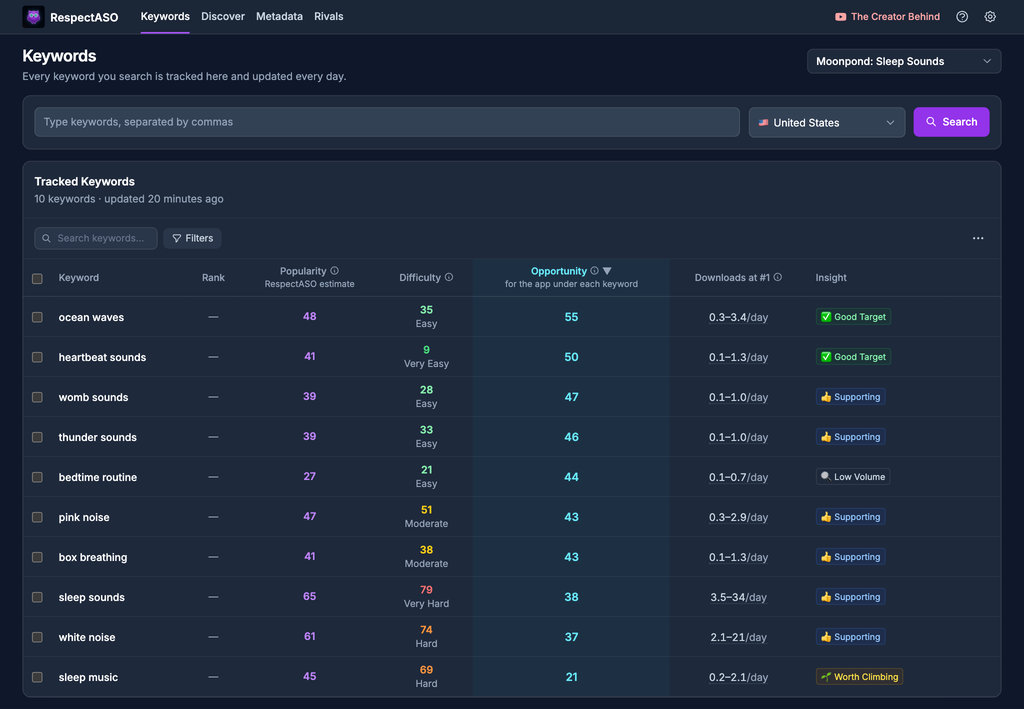
Keyword research in RespectASO: a score and a tag for every keyword
Optimize Your Kids App
Use RespectASO to research keywords and build a data-driven ASO strategy for Kids apps.