Indie Developer Workflow
ASO for indie developers: a workflow that fits one-person teams
Keyword research for indie iOS developers: free at its core, with Pro AI when you need speed.
The indie ASO problem in one paragraph
You're shipping an iOS app on your own. You don't have a 12-tool MarTech stack, you don't have time for a SaaS sales call, and you can't justify a monthly ASO subscription to research one app. But you also can't afford to launch with metadata you guessed. The keywords you pick, the country you list in, and the title you write determine whether anyone finds you in the first 30 days. This page shows the workflow we built RespectASO around: the one that fits when the entire team is you.
What you actually need to do
Strip the noise away and the indie ASO job is small:
- Find 10–30 candidate keywords that match what real people search for in the App Store.
- Score each one for popularity (is anyone searching it?) and difficulty (can a small app rank for it?).
- Pick the country or countries where that keyword set has real opportunity.
- Write a title, subtitle, and keyword field that fits Apple's character limits and uses the strongest terms.
- Track ranks after launch so you know which terms to double down on or replace.
Everything else is optional. The workflow below maps each of those steps to a verified RespectASO feature.
The indie workflow with RespectASO
Brainstorm keywords with multi-keyword search
Start with 10–20 candidate terms inspired by what your app does and what competitors target. Run them as a single batch in the Mac app and get popularity, difficulty, and ranking-tier scores side by side. No accounts, no API keys.
Pick a launch country with the Country Opportunity Finder
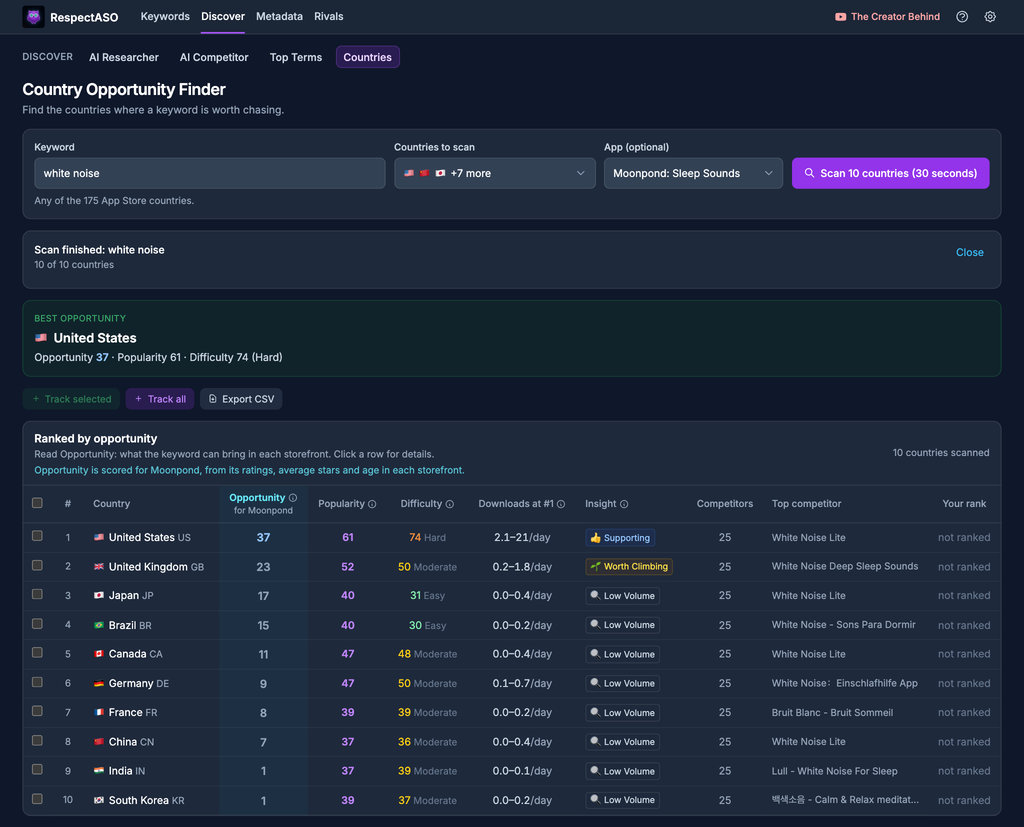
Run your strongest keyword across as many of the 175 App Store storefronts as you want, in the background. The opportunity score sorts countries by how realistic ranking is for a fresh app, so you can launch where competition is thinner instead of fighting US Top 5 from day one.
Study one top competitor
For each shortlisted keyword, the free edition shows the Top 10 ranking apps with ratings, review counts, and category. Pick one that's structurally similar to yours and study how they wrote the title, subtitle, and screenshots. If you have Pro, the AI Competitor Analyzer turns this into a single guided breakdown.
Draft metadata that fits Apple's limits
Use the title, subtitle, and keyword field counters to draft a metadata bundle that fits the 30/30/100 character budget without wasting space. Pro adds the ASO Score Simulator to evaluate the bundle before you ship.
Track ranks after release
Add your app and your tracked keywords. The free edition shows where you rank for each term alongside competitor data, so you can see within days what's working, what isn't, and what to replace in the next metadata update.
What the workflow looks like in the app
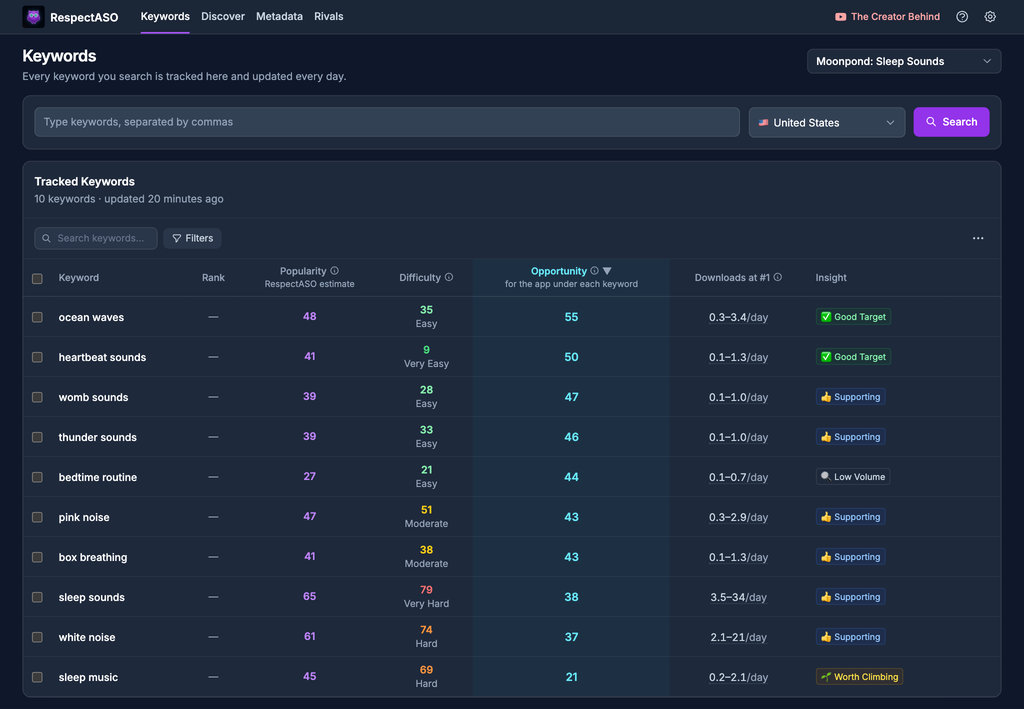
The Keywords page is where most of the indie workflow happens: type a keyword, get popularity, difficulty, and competitor breakdowns, repeat. The Country Opportunity Finder lives one tab over for picking launch markets:
Where Pro starts to pay off (and where it doesn't)
You can ship a strong indie launch on the free edition alone. Pro is worth the cost once you research keywords every week, not when you're researching one keyword for one app.
| Scenario | Free edition is enough | Pro pays off |
|---|---|---|
| One app, one launch, casual research | Yes | Probably no |
| You want a full niche map from one seed keyword | Possible but slow | AI Niche Researcher does it in one prompt |
| You want a structured competitor breakdown | You can do it manually with Top 10 data | AI Competitor Analyzer turns it into a guided report |
| You want to evaluate a full metadata bundle before shipping | Use the counters and judgement | ASO Score Simulator scores the bundle |
| You ship metadata updates frequently across multiple apps | Workable | Pro saves real hours |
If you want to see the AI workflow before deciding, the Pro page walks through each agentic workflow with screenshots: RespectASO Pro. For the cost, see the pricing page. We don't quote prices outside that page so the number always reflects the live offer.

Engine
Engine
Why local-first matters for indies
- No subscription that scales with use. The free edition is free; Pro is one payment for 3 months or a year, not a per-keyword or per-app fee.
- No vendor lock-in on your research. Your keyword history lives in a local database. If you stop using RespectASO, the data is yours.
- No surprise data leak. The terms you research and the apps you track are leading indicators of what you're building. We don't see them.
- BYOK for AI. If you do upgrade to Pro, you supply your own LLM API key. AI cost stays under your control instead of being baked into a subscription.
For the architecture details, see the open-source ASO tool page, the self-hosted ASO tool page, and the privacy-first ASO tool page.
Honest limitations
- RespectASO is built for the iOS App Store via Apple's public iTunes Search API. It doesn't cover Google Play and isn't an Apple Search Ads product.
- The free edition is a native Mac app. If you don't run macOS, you can self-host the free edition with Docker, but Pro AI features ship only with the Mac app.
- Local-first means the data on your machine is your responsibility. Back up your
~/Library/Application Support/RespectASO/folder if you'd lose work without it.
FAQ
I'm pre-launch with no app yet. Can I still research?
Yes. Multi-keyword search and the Country Opportunity Finder don't require you to add an app. Use them to validate keyword demand and pick a launch country before you're in App Store Connect.
How does an indie pick keywords without burning a week?
Start with 10–20 obvious candidates from your concept and competitors. Run them through multi-keyword search and keep the ones with strong popularity and tractable difficulty for Top 10. That short list usually contains your title, subtitle, and most of your keyword field.
Should I localize at launch?
Often yes, but not by translating the same keyword field into 175 storefronts. Use the Country Opportunity Finder to find storefronts where a smaller indie app actually has a chance, and localize for those first. The Localization Hub walks through the wider strategy.
Where do I learn the basics if ASO is brand new to me?
Start with the ASO glossary, the keyword research guide, and the methodology page. Together they cover the vocabulary, the workflow, and how RespectASO scores keywords.
How is this page different from the indie alternatives listicle?
The best ASO tools for indie developers listicle is a tool comparison: it ranks RespectASO against other options. This page is a workflow walkthrough: it shows you the steps and which RespectASO features support each one.
Run the indie ASO workflow on your Mac
Download the free edition for the core workflow, or look at Pro when you want the AI workflows. No account, no telemetry, no surprises.
All free features · ASO tools for indies (compared) · Keyword research hub · Localization hub