Category Guide
App Store Optimization for Photo & Video Apps: Strategy Guide
ASO strategy guide for photo and video apps on iOS. Keyword research for camera, editing, and filter apps with visual metadata optimization tips.
The Photo & Video Category Landscape
Photo & Video is a visually driven category where camera apps, photo editors, video editors, and filter tools compete for a creative user base. The category is dominated by professional-grade tools (Adobe Lightroom, VSCO, CapCut) and platform-native editing features, but the breadth of creative use cases creates substantial opportunities for specialized apps.
Users in this category range from professionals editing RAW photos to teenagers adding stickers to selfies. Your keyword strategy must reflect which segment you serve, because professionals and casual creators search with different words.
Keyword Patterns in Photo & Video
Tool-Type Keywords
Most searches in this category name a tool:
- Photo editor: "photo editor," "retouch," "raw photo editor"
- Video editor: "video editor," "video maker," "slow motion"
- Camera: "camera," "vintage camera"
- Filters and effects: "filter," "presets," "film filter"
- Collage: "collage," "photo grid," "photo collage maker"
- Specialized: "background remover," "ai background remover," "remove background from photo"
Style and Aesthetic Keywords
Photo & Video users often search by the look they want: "aesthetic," "vintage camera," "film filter," "cinematic video." Style keywords are natural candidates for your keyword field; compare their popularity and difficulty with the tool keywords in the table below before you spend characters on them.
AI Feature Keywords
AI features have their own searches: "ai photo editor," "ai background remover," "portrait editor." If your app offers AI capabilities, the table shows where these stand next to the classic tool keywords, and RespectASO shows their opportunity for your own app.
24 photo and video keywords, measured in the US App Store
Measured by RespectASO on 6 October 2026. Popularity is RespectASO's estimate of how often a keyword is searched compared with others, from 1 to 100. Difficulty, from 1 to 100, says how hard the apps already on top are to pass. "In top 10 names" counts the top ten apps with the keyword in their name. How the numbers work.
| Keyword | Popularity | Difficulty | In top 10 names |
|---|---|---|---|
| Head terms | |||
| photo editor | 71 | 87 Very Hard | 8 of 10 |
| video editor | 70 | 89 Very Hard | 9 of 10 |
| camera | 65 | 77 Very Hard | 9 of 10 |
| filter | 63 | 76 Very Hard | 4 of 10 |
| collage | 74 | 83 Very Hard | 10 of 10 |
| video maker | 61 | 82 Very Hard | 4 of 10 |
| Features and sub-genres | |||
| background remover | 51 | 69 Hard | 1 of 10 |
| retouch | 67 | 78 Very Hard | 6 of 10 |
| presets | 56 | 60 Hard | 5 of 10 |
| photo grid | 62 | 75 Hard | 2 of 10 |
| slow motion | 57 | 64 Hard | 7 of 10 |
| raw photo editor | 42 | 72 Hard | 2 of 10 |
| Audiences and uses | |||
| aesthetic | 69 | 75 Hard | 5 of 10 |
| vintage camera | 59 | 70 Hard | 6 of 10 |
| film filter | 47 | 60 Hard | 0 of 10 |
| cinematic video | 40 | 46 Moderate | 2 of 10 |
| portrait editor | 51 | 69 Hard | 0 of 10 |
| ai photo editor | 70 | 80 Very Hard | 7 of 10 |
| Long-tail phrases | |||
| remove background from photo | 35 | 57 Hard | 0 of 10 |
| raw photo editor and presets | 25 | 46 Moderate | 0 of 10 |
| ai background remover | 50 | 68 Hard | 3 of 10 |
| edit photos and videos | 42 | 60 Hard | 0 of 10 |
| photo collage maker | 62 | 81 Very Hard | 7 of 10 |
| slow motion video editor | 53 | 76 Very Hard | 6 of 10 |
Difficulty here runs from 46 for "cinematic video" to 89 for "video editor". 14 of the 24 keywords score 70 or more, and none score under 30. The long-tail phrases have a median difficulty of 64, against 82 for the head terms. The highest popularity among keywords under difficulty 50 belongs to "cinematic video": 40, at difficulty 46.
To see what these keywords would bring your own app, and to measure them in any of the 175 storefronts, run them in RespectASO, free on your Mac.
Metadata Optimization for Photo & Video Apps
Show, Don't Tell
This is the one category where screenshots matter more than anything else. Users evaluating photo and video tools judge quality by visual results. Your screenshots should show stunning before/after comparisons, beautiful filter examples, or impressive video exports. The quality of your screenshot visuals shapes your conversion rate.
Feature Specificity in Metadata
The subtitle should specify your app's primary function: "RAW Photo Editor & Presets" or "AI Background Remover." A generic subtitle like "Edit Photos & Videos" describes thousands of apps; a specific one matches the users who know what they want.
Common ASO Mistakes in Photo & Video
- Targeting "photo editor" head-on: Compare it in the table with its qualified forms ("raw photo editor," "portrait editor," "ai photo editor") before you put it in your title. A modifier keeps the intent and narrows the field.
- Low-quality sample images: If your screenshots show mediocre editing results, users will assume the app produces mediocre results. Invest in showcasing your best possible visual output.
- Ignoring video keywords: Even if your app is primarily a photo tool, video keywords (if you have video features) let you match the people who want one app for both.
- Missing format keywords: Users search for specific capabilities: "RAW," "4K," "HDR," "HEIC," "PNG," "GIF." These technical keywords attract power users.
Competitor Landscape
Adobe products, VSCO, Snapseed, CapCut, and InShot dominate broad photo/video keywords. However, the creative tools space fragments significantly by specialty. Niche tools for specific editing tasks (watermark removal, batch editing, specific filter styles, analog film emulation) are a market of their own. Analyze which specific features top apps don't emphasize, and position your keywords accordingly.
International Opportunity
Photo and video editing is universal: the creative instinct crosses all cultures. Markets like South Korea (selfie and beauty editing culture), Japan (filter and sticker culture), and Brazil (social media content creation) each have their own creative culture and their own words for it. Use the Country Opportunity Finder to compare the opportunity of your localized keywords with their English equivalents.
How RespectASO Helps
Photo & Video apps benefit from evaluating both functional keywords (tool types) and style keywords (aesthetics) simultaneously. Use Multi-Keyword Search to score all candidate keywords across your target markets, then focus your limited 160-character metadata budget on the terms with the best opportunity for your app.
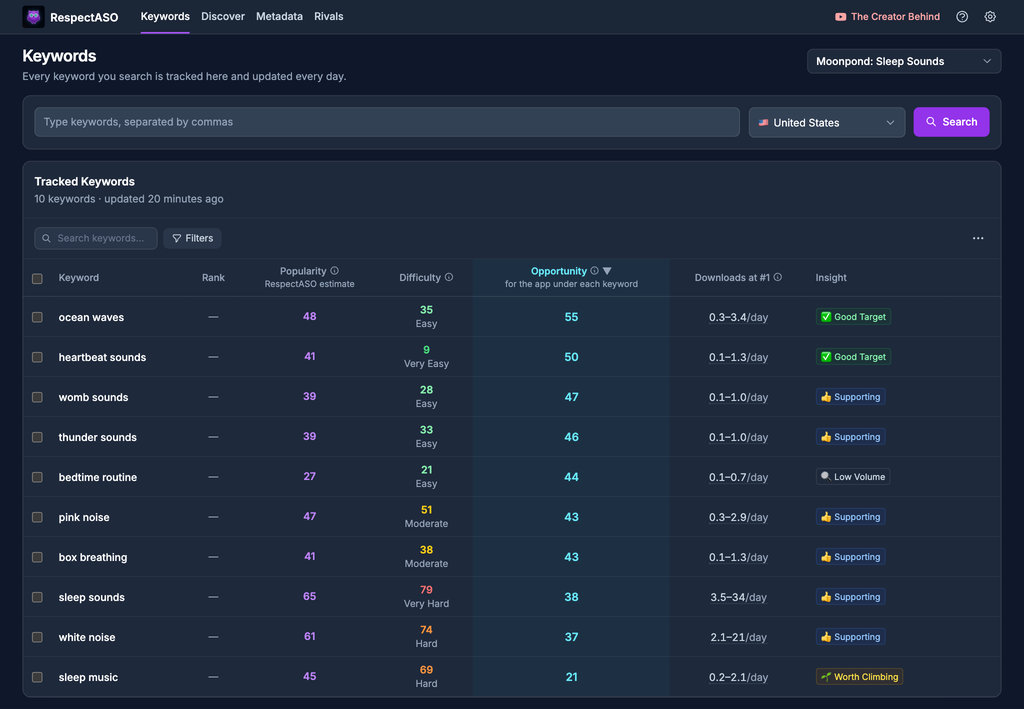
Keyword research in RespectASO: a score and a tag for every keyword
Optimize Your Photo & Video App
Use RespectASO to research keywords and build a data-driven ASO strategy for Photo & Video apps.