Category Guide
App Store Optimization for Utilities Apps: Strategy Guide
ASO strategy guide for utility apps on iOS. Keyword targeting for tool-based apps, functional metadata, and strategies to stand out in a functional category.
The Utilities Category Landscape
Utilities are the workhorses of the App Store — apps that solve specific, practical problems: calculators, QR scanners, flashlights, file managers, VPNs, battery monitors, and system tools. Users come to this category with clear, functional intent. They know what they need, search for it directly, and download the first app that looks reliable. This pattern makes ASO especially impactful: if your app appears for the right keyword at the right position, conversion is high.
The challenge is that many utility functions are commoditized. Dozens of QR scanners and calculators compete for the same keywords with similar feature sets. Differentiation comes from keyword specificity, polished design, and trust signals like ratings.
Keyword Patterns in Utilities
Function-First Search
Utility users search for what they need to do, not for app names:
- Core function: "calculator," "QR scanner," "VPN," "file manager," "compass"
- Feature modifiers: "scientific calculator," "QR code reader," "free VPN," "PDF scanner"
- Context modifiers: "offline," "no ads," "private," "fast," "simple"
The most valuable keywords combine a core function with a qualifying modifier. "Calculator" has extreme difficulty, but "scientific calculator" or "tip calculator" have significantly lower competition while targeting users with specific needs and higher conversion intent.
Privacy and Security Keywords
A growing trend in utilities is privacy-focused search. Keywords like "private browser," "secure VPN," "password manager," and "encrypted" have increasing popularity. If your utility app has privacy features, these keywords are worth targeting — they attract users willing to pay for quality.
Metadata Optimization for Utility Apps
Clarity Is Everything
For utilities, the subtitle should describe exactly what the app does. Users scanning search results need instant recognition: "PDF Scanner & OCR" or "Battery Health Monitor." There's no need for personality or flair — just functional clarity with strong keywords.
Keywords for Every Use Case
Utility apps often serve multiple use cases. A file manager might be used for document storage, photo backup, or cloud access. Use the keyword field to cover all use cases with individual words: "document," "backup," "cloud," "zip," "extract," "USB," "transfer." The search algorithm will combine these with your title and subtitle words to match diverse search queries.
Common ASO Mistakes in Utilities
- The "simple" trap: Many utility developers name their app "Simple Calculator" or "Easy Scanner." While "simple" is a conversion-helping word, it wastes valuable title space. Use it in the subtitle or keyword field instead, and put a more distinctive name in the title.
- Neglecting screenshots: Utility apps often have minimal screenshot investment. But showing a clean, well-designed interface with populated data (scan results, calculations, file listings) builds trust and differentiates from low-quality alternatives.
- Not targeting "alternative to X" searches: Users sometimes search for alternatives to built-in iOS apps or popular utilities. If your app improves on the default calculator, flashlight, or compass, related keywords capture replacement-seeking users.
- Ignoring Apple feature competition: iOS periodically absorbs utility functions (flashlight, QR scanning, compass). When Apple builds a utility into iOS, search volume for that function may drop. Stay aware of iOS updates and pivot keywords accordingly.
Competitor Landscape
Utilities face a unique competitive dynamic: Apple's own built-in apps. When iOS added native QR scanning, the QR scanner category contracted significantly. Despite this, third-party utilities thrive when they offer features beyond Apple's defaults — batch scanning, advanced calculations, specialized tools, or cloud integration. Competitor analysis should identify what additional value top-ranking utilities provide beyond the OS default.
International Opportunity
Utility needs are universal — everyone needs a calculator, scanner, or file manager. This makes utilities excellent candidates for localization. Many utility apps only optimize for English, leaving international markets wide open. The Country Opportunity Finder can reveal that common utility keywords have Sweet Spot profiles in markets like Brazil, Turkey, Mexico, and Thailand.
How RespectASO Helps
Utility apps benefit from thorough keyword research because function-specific keywords have wide variation in competition. Use Multi-Keyword Search to compare core function keywords, feature modifiers, and context qualifiers side by side. Find the combinations that yield the best opportunity scores, then expand to international markets where the same utility keywords face far less competition.
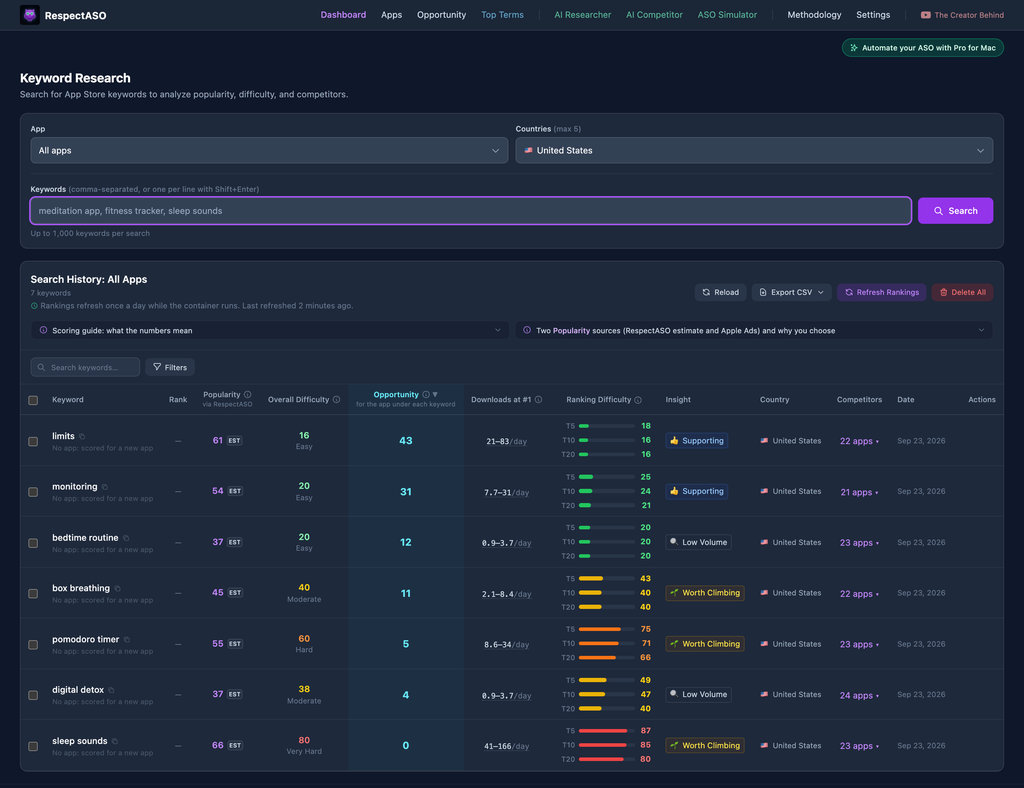
RespectASO's keyword research dashboard: a score and a tag for every keyword
Optimize Your Utilities App
Use RespectASO to research keywords and build a data-driven ASO strategy for Utilities apps.