App Store promotional text: what it is, its limit, and how to use it
The line of up to 170 characters at the top of your App Store description, which you can change at any time without a new version.
Promotional text is the short line at the top of your App Store page, above the description. In Apple's words, it "appears at the top of the description and is up to 170 characters long", and "you can update promotional text at any time without having to submit a new version of your app" (Apple, Creating your product page). The description is the opposite: "You can update your app's description when you submit a new version of your app." So promotional text is the one line of your page you can change today.
Promotional text vs description
| Promotional text | Description | |
|---|---|---|
| Length | "can't be longer than 170 characters" | "Limited to 4000 characters" |
| When it changes | "at any time" | "when you submit a new version of your app" |
| Review | "without requiring an updated submission" | goes with the new version you submit |
| Where it shows | "above your description on the App Store" | "on your app's product page, when users install your app" |
The limits and where each field shows are quoted from App Store Connect Help's platform version information, the rest from Apple's product page guide above, both read on 18 November 2026.
What to put in it
Apple is clear that this line is for people, not for search: "promotional text doesn't affect your app's search ranking so it should not be used to display keywords." Its job is the visitor who just arrived. Apple suggests using it "to share the latest news about your app, such as limited-time sales or upcoming features." Three things work well:
- The searches your app is found for. Someone who searched "rain sounds" and lands on your page reads this line first. Name what they came for, in a real sentence, never as a list of keywords.
- An event or an offer. A season, a challenge, a limited-time offer: it can go up the day it starts and come down the day it ends.
- What is new. A feature people asked for, said in one line, so returning visitors see it before the screenshots.
Use the space. A line of 60 characters leaves most of the slot empty, so aim for 150 to 170.
Examples
Three invented apps, each line within Apple's 170 characters:
- Moonpond: Sleep Sounds, for people who search sleep sounds
“Fall asleep to rain sounds, white noise and ocean waves. New this week: a sleep timer that fades the sound out slowly, so nothing wakes you in the middle of the night.” (167 characters) - Lullgate: Reduce Screen Time, with an event
“Set a daily screen time limit for the apps that eat your evenings. This month, join the 30 day focus challenge and keep your streak going with a friend who joins too.” (166 characters) - Harborline: Tide Times, with the season and what is new
“Summer tides are here: high and low water for your beach, with wind, swell and sunset times. New in this version: tide widgets for your Home Screen and Lock Screen.” (164 characters)
Before you paste a line into App Store Connect, check your name, subtitle and keyword field too with the App Store metadata checker.
How RespectASO writes it
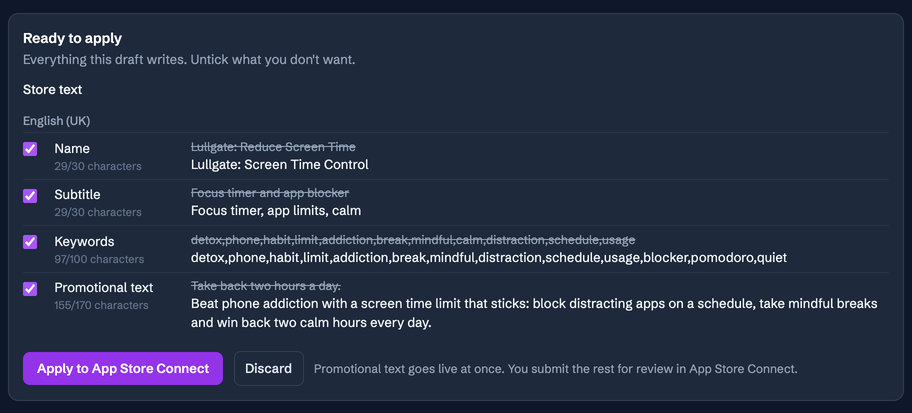
In Get found, your AI writes the promotional text in every language of your page: 150 to 170 characters, for the people who arrive from your strongest searches, as real sentences in that language. It shows the old line above the new one, and when you apply, the new line goes live on your App Store page at once, with no review. Every change keeps its old text, and Restore puts it back at any time.
A custom product page has promotional text of its own, written for the searches that page is linked to. Writing for another country? Our localization guide covers which markets to reach first. Every step of the Get found tab: the Get found guide.
Let RespectASO write your next line
Get found writes your promotional text, name, subtitle and keywords from the searches you track, in every language of your page.