Category Guide
App Store Optimization for Music Apps: Strategy Guide
ASO strategy guide for music apps. Keyword research for streaming, production, and instrument apps with competitive analysis and metadata tips.
The Music Category Landscape
Music apps divide into consumption (streaming, radio, discovery), creation (production, recording, beat-making), learning (instruments, theory, ear training), and utility (tuning, metronome, lyrics). A handful of giants own streaming; creation, learning and utility are where independent developers find room.
Music users are specific: a guitarist searches for "guitar tuner," not "music app." That specificity creates natural keyword niches, and the measured table below puts "music" itself next to them so you can see the difference.
Keyword Patterns in Music
Sub-Category Keywords
Each segment has its own vocabulary: streaming ("music," "songs," "playlist"), production ("beat maker," "music production," "synth"), learning ("learn piano," "guitar lessons," "music theory"), instrument tools ("guitar tuner," "metronome," "drum machine") and discovery ("lyrics," "song identifier"). Spotify, Apple Music and Shazam sit on the streaming and discovery terms; the measured table shows how hard each segment's keywords are to rank for today.
Instrument-Specific Keywords
Instrument names form natural long-tail keywords: "guitar tuner," "piano chords," "drum pad," "ukulele tuner." Each instrument has its own players, so an app targeting "ukulele tuner" is not up against the same apps as one chasing "music." Read their difficulty side by side in the table.
Genre and Style Modifiers
Genre keywords create further segmentation: "lo-fi beats," "jazz piano chords," "hip hop beat maker," "classical sheet music." For production and learning apps, including genre modifiers in the keyword field captures users who search not just for a function but for a style of music they want to create or learn.
24 music keywords, measured in the US App Store
Measured by RespectASO on 6 October 2026. Popularity is RespectASO's estimate of how often a keyword is searched compared with others, from 1 to 100. Difficulty, from 1 to 100, says how hard the apps already on top are to pass. "In top 10 names" counts the top ten apps with the keyword in their name. How the numbers work.
| Keyword | Popularity | Difficulty | In top 10 names |
|---|---|---|---|
| Head terms | |||
| music | 85 | 86 Very Hard | 10 of 10 |
| songs | 66 | 80 Very Hard | 2 of 10 |
| playlist | 65 | 55 Moderate | 1 of 10 |
| guitar tuner | 60 | 70 Hard | 7 of 10 |
| metronome | 62 | 69 Hard | 10 of 10 |
| learn piano | 62 | 71 Hard | 5 of 10 |
| Features and sub-genres | |||
| beat maker | 60 | 73 Hard | 4 of 10 |
| drum machine | 46 | 56 Hard | 6 of 10 |
| music production | 44 | 43 Moderate | 0 of 10 |
| synth | 49 | 43 Moderate | 9 of 10 |
| lyrics | 61 | 61 Hard | 7 of 10 |
| song identifier | 50 | 54 Moderate | 4 of 10 |
| Audiences and uses | |||
| guitar lessons | 53 | 68 Hard | 3 of 10 |
| music theory | 52 | 41 Moderate | 4 of 10 |
| ukulele tuner | 58 | 69 Hard | 7 of 10 |
| piano chords | 45 | 49 Moderate | 6 of 10 |
| drum pad | 57 | 69 Hard | 4 of 10 |
| lo-fi beats | 37 | 12 Very Easy | 1 of 10 |
| Long-tail phrases | |||
| beginner guitar lessons | 38 | 52 Moderate | 0 of 10 |
| bass guitar tab reader | 35 | 47 Moderate | 0 of 10 |
| hip hop beat maker | 35 | 54 Moderate | 1 of 10 |
| classical sheet music | 37 | 53 Moderate | 0 of 10 |
| learn piano songs | 41 | 62 Hard | 0 of 10 |
| jazz piano chords | 35 | 13 Very Easy | 1 of 10 |
Difficulty here runs from 12 for "lo-fi beats" to 86 for "music". 5 of the 24 keywords score 70 or more, and 2 score under 30. The long-tail phrases have a median difficulty of 52, against 70 for the head terms. The highest popularity among keywords under difficulty 50 belongs to "music theory": 52, at difficulty 41.
To see what these keywords would bring your own app, and to measure them in any of the 175 storefronts, run them in RespectASO, free on your Mac.
Metadata Optimization for Music Apps
Name the Instrument or Function
Generic names fail in Music. "GarageBand" works only because Apple made it; an indie app named "MusicMaker" would disappear. Your title should specify the instrument or function: "Piano: Learn & Play Songs" or "BeatMaker: Music Production." The subtitle adds depth: "Chord Trainer & Sheet Reader" or "Drum Loops & MIDI Sequencer."
Skill Level Keywords
For learning apps, skill-level modifiers match real search intent: "beginner guitar lessons," "easy songs," "learn piano songs." A complete beginner doesn't want the same app as a conservatory student. Include skill-level terms in your keyword field; the search algorithm combines them with instrument terms from your title to match specific queries like "beginner guitar lessons."
Common ASO Mistakes in Music
- The "music" keyword trap: "Music" is the first word every music app reaches for. Compare its difficulty in the measured table with "music production" or "music theory," and spend your metadata on the specific combination.
- Ignoring hardware keywords: Many musicians search by hardware: "midi controller," "audio interface," "loop pedal." If your app works with specific hardware, these keywords match exactly what the searcher owns.
- Under-utilizing the keyword field: Music apps have more relevant keyword variations than most categories: instrument names, genres, techniques, skill levels, hardware. Fill all 100 characters of the keyword field strategically.
- Screenshots that don't show audio: Screenshots for production apps should show waveforms, mixing interfaces, and instruments. Users want to see professional capability at a glance.
Competitor Landscape
Streaming is locked down by Spotify, Apple Music, and YouTube Music. Song identification belongs to Shazam. Production apps (GarageBand, BandLab, FL Studio Mobile), learning apps (Yousician, Simply Piano), and instrument utilities are spread across many more publishers. Competitor analysis on a specific instrument and function niche, such as "bass guitar tab reader," shows you exactly whose listings you would have to pass; the last column of the measured table counts how many of the top ten even name the keyword.
International Opportunity
Music is a universal language, but the apps people search for vary by market: production, piano and guitar apps each find different audiences in the US, the UK, Brazil or South Korea. The Country Opportunity Finder measures your instrument or function keywords storefront by storefront, so you can see where search demand and competition balance before you localize.
How RespectASO Helps
Music apps need to evaluate keyword combinations across instruments, genres, functions, and skill levels, which makes a potentially large matrix. Use Multi-Keyword Search to score instrument keywords, function keywords, and genre modifiers together. The opportunity score shows which instrument-function combinations can bring your app the most, helping you allocate your 160 characters of metadata.
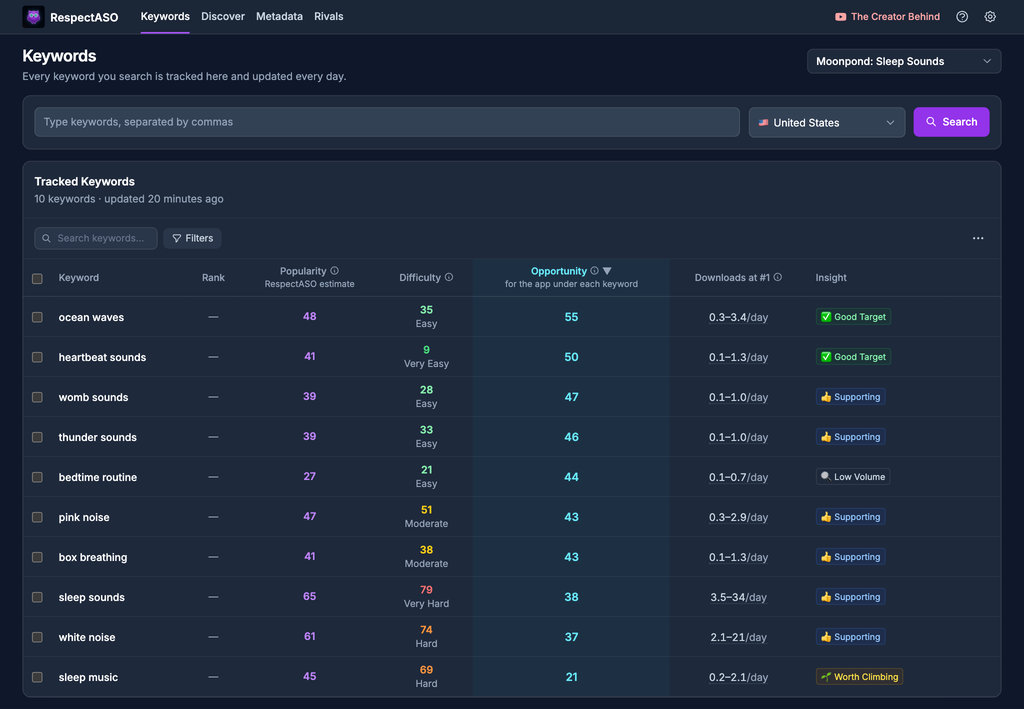
Keyword research in RespectASO: a score and a tag for every keyword
Optimize Your Music App
Use RespectASO to research keywords and build a data-driven ASO strategy for Music apps.