Category Guide
App Store Optimization for News Apps: Strategy Guide
ASO strategy guide for news apps on iOS. Keyword targeting for media, journalism, and aggregator apps with freshness and authority signals.
The News Category Landscape
News apps span major news outlets, aggregators, local news, topic-specific feeds (tech, finance, politics), audio news, and citizen journalism platforms. The category is defined by trust, timeliness, and habitual daily use. Established media brands hold the broad news searches; aggregators, topic feeds and local news apps compete on narrower ones, and the measured table below shows how far apart the two are.
Users search by function ("news"), by topic ("sports news," "tech news"), or by brand. For independent developers, topic and format keywords are the place to look first.
Keyword Patterns in News
News Format Keywords
News searches come in five formats: general news ("news," "breaking news," "headlines"), aggregators ("news reader," "rss"), topic feeds ("tech news," "crypto news"), local news ("local news") and audio or summaries ("news summary," "daily briefing," "audio news"). CNN, the BBC and Apple News sit on the general terms; the measured table shows each format's keywords next to them.
Topic-Specific Keywords
Combining "news" with a topic creates natural long-tail keywords: "business news," "science news," "gaming news." Major outlets try to rank for everything rather than one vertical, which leaves room for an app built around a single topic. Compare the difficulty of "tech news" and "business news" with "news" itself in the table.
Format and Feature Keywords
How users consume news creates keyword opportunities: "news widget," "news alerts," "offline news reader," "ad free news," "news without ads." These functional modifiers attract users frustrated with mainstream news apps and searching for alternatives with specific capabilities.
24 news keywords, measured in the US App Store
Measured by RespectASO on 6 October 2026. Popularity is RespectASO's estimate of how often a keyword is searched compared with others, from 1 to 100. Difficulty, from 1 to 100, says how hard the apps already on top are to pass. "In top 10 names" counts the top ten apps with the keyword in their name. How the numbers work.
| Keyword | Popularity | Difficulty | In top 10 names |
|---|---|---|---|
| Head terms | |||
| news | 71 | 89 Very Hard | 9 of 10 |
| breaking news | 66 | 79 Very Hard | 8 of 10 |
| headlines | 53 | 49 Moderate | 5 of 10 |
| local news | 70 | 81 Very Hard | 4 of 10 |
| news reader | 54 | 70 Hard | 3 of 10 |
| news app | 50 | 66 Hard | 0 of 10 |
| Features and sub-genres | |||
| rss | 43 | 43 Moderate | 8 of 10 |
| news summary | 43 | 52 Moderate | 0 of 10 |
| daily briefing | 34 | 26 Easy | 2 of 10 |
| audio news | 50 | 65 Hard | 1 of 10 |
| news widget | 49 | 67 Hard | 0 of 10 |
| news alerts | 49 | 71 Hard | 2 of 10 |
| Audiences and uses | |||
| tech news | 45 | 57 Hard | 3 of 10 |
| sports news | 69 | 81 Very Hard | 5 of 10 |
| business news | 60 | 77 Very Hard | 3 of 10 |
| science news | 46 | 56 Hard | 5 of 10 |
| crypto news | 48 | 56 Hard | 6 of 10 |
| gaming news | 42 | 51 Moderate | 4 of 10 |
| Long-tail phrases | |||
| news without ads | 44 | 47 Moderate | 0 of 10 |
| ad free news | 41 | 54 Moderate | 0 of 10 |
| tech news and trends | 33 | 36 Moderate | 0 of 10 |
| daily news briefing | 41 | 22 Easy | 3 of 10 |
| offline news reader | 28 | 19 Easy | 1 of 10 |
| ai news summary | 25 | 10 Very Easy | 1 of 10 |
Difficulty here runs from 10 for "ai news summary" to 89 for "news". 7 of the 24 keywords score 70 or more, and 4 score under 30. The long-tail phrases have a median difficulty of 29, against 74 for the head terms. The highest popularity among keywords under difficulty 50 belongs to "headlines": 53, at difficulty 49.
To see what these keywords would bring your own app, and to measure them in any of the 175 storefronts, run them in RespectASO, free on your Mac.
Metadata Optimization for News Apps
Differentiate by Focus or Format
Your title must communicate what makes your news app different from the dozens of alternatives. "Tech News & Trends" tells a searcher far more than "NewsApp." The subtitle should reinforce either your topic focus ("AI, Startups & Gadgets") or your format advantage ("Ad-Free Daily Briefings"). Clear positioning is what sets one news app apart from the next.
Freshness Matters in Screenshots
Screenshots for news apps face a unique challenge: dated headlines make your app look abandoned. Use screenshots with generic but current-looking headlines, or update screenshots quarterly to reflect recent events. First-impression conversion depends on the app looking actively maintained.
Common ASO Mistakes in News
- Targeting "news" alone: "News" is the term every news app wants. Check its row in the measured table before you spend title characters on it, and combine it with topic or format modifiers in your keyword field instead.
- No clear editorial angle: Users choose news apps based on editorial perspective, topic coverage, or format preference. "A new way to read news" doesn't differentiate. Specify exactly what kind of news and how it's delivered.
- Ignoring widget keywords: News is one of the strongest use cases for iOS widgets. Users actively search for "news widget," so if your app offers widgets, this keyword deserves prominent placement.
- Not localizing for regional markets: News is inherently local beyond the global headlines. A news app localized for a specific country immediately gains relevance for that market's news-related searches.
Competitor Landscape
Major media brands (CNN, BBC, Reuters) and platform aggregators (Apple News, Google News, Flipboard) hold the broad news keywords. Competitor analysis on a specific topic vertical, local news for a mid-sized city, or a format such as audio summaries shows you the listings you would actually have to pass. The key is picking a niche the big players underserve.
International Opportunity
Every country has its own news habits, mostly served by local-language media brands. A well-built news reader localized for Turkey, Indonesia, or Brazil competes with those local listings, not with the global outlets. The Country Opportunity Finder measures news keywords storefront by storefront, so you can see where demand and competition favour your app.
How RespectASO Helps
News apps need to evaluate topic keywords, format keywords, and feature keywords across multiple markets. Use Multi-Keyword Search to score combinations like "tech news," "business news," "news widget," and "daily briefing" together. The opportunity score shows which topic-format combinations can bring your app the most, helping you choose the niche where your news app can build visibility.
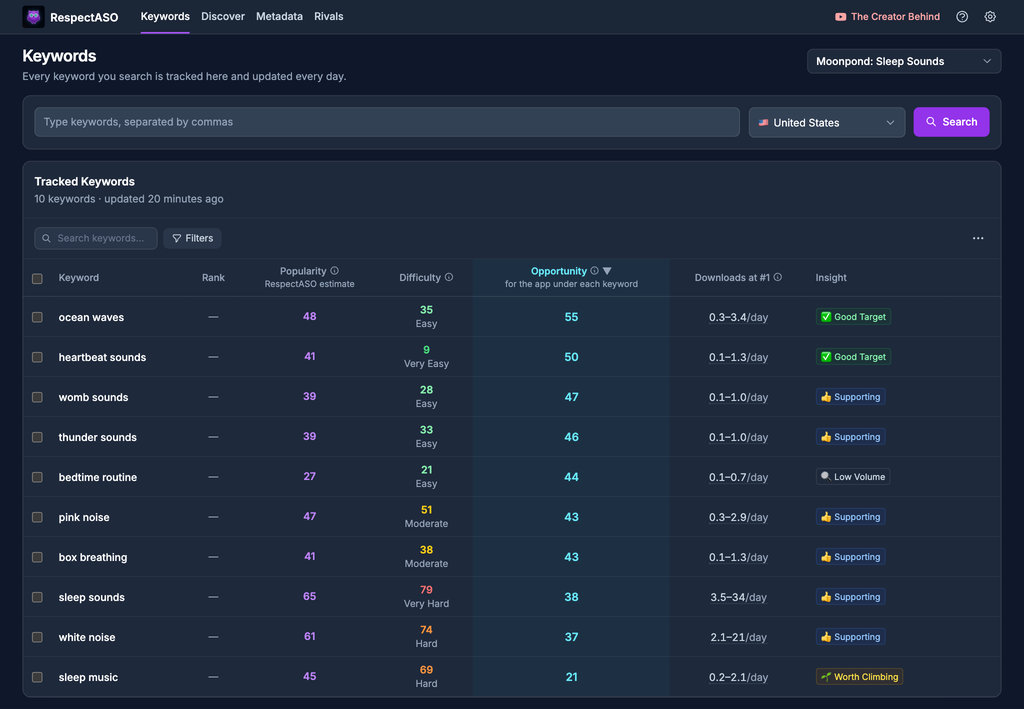
Keyword research in RespectASO: a score and a tag for every keyword
Optimize Your News App
Use RespectASO to research keywords and build a data-driven ASO strategy for News apps.