Category Guide
App Store Optimization for Weather Apps: Strategy Guide
ASO strategy guide for weather apps on iOS. Keyword targeting and metadata optimization for a utility-driven category with high daily engagement.
The Weather Category Landscape
Weather apps are among the most frequently opened apps on any phone: daily or multiple-times-daily usage is the norm. The category appears simple (show the forecast) but divides into general weather, severe weather alerts, radar and maps, hyperlocal forecasts, marine/aviation weather, and weather widgets. High daily engagement makes weather a surprisingly valuable category despite its relatively small size.
For independent developers, the opportunity lies in specialization: weather for specific activities (sailing, skiing, gardening, photography), superior widget design, or extreme weather tools. These are areas where the major weather apps provide generic solutions rather than purpose-built experiences.
Keyword Patterns in Weather
Weather Function Keywords
Weather searches fall into five types: the general forecast ("weather," "forecast," "temperature"), radar ("weather radar," "rain radar," "storm tracker"), widgets ("weather widget," "live weather"), activities ("sailing weather," "ski conditions," "pollen") and alerts ("severe weather alerts," "hurricane tracker"). Apple Weather and Weather.com sit on the general terms; the measured table shows each type's keywords next to them.
Activity-Specific Weather Keywords
Users who need weather for a specific purpose search accordingly: "hiking weather," "beach forecast," "fishing weather," "sailing weather." Major weather apps don't build for these long-tail keywords, and the table shows how their difficulty compares with "weather" itself. An app tailored for sailors, pilots, or gardeners can make these searches its own.
Widget and Display Keywords
Weather is a prime widget use case: users want to see the forecast without opening an app. "Weather widget," "lock screen weather," "live weather wallpaper," and "weather clock widget" represent users looking for constant-display solutions. These feature-oriented keywords attract users who already have a weather app but want a better display experience.
24 weather keywords, measured in the US App Store
Measured by RespectASO on 6 October 2026. Popularity is RespectASO's estimate of how often a keyword is searched compared with others, from 1 to 100. Difficulty, from 1 to 100, says how hard the apps already on top are to pass. "In top 10 names" counts the top ten apps with the keyword in their name. How the numbers work.
| Keyword | Popularity | Difficulty | In top 10 names |
|---|---|---|---|
| Head terms | |||
| weather | 77 | 88 Very Hard | 10 of 10 |
| forecast | 74 | 66 Hard | 5 of 10 |
| weather radar | 73 | 82 Very Hard | 7 of 10 |
| rain radar | 57 | 77 Very Hard | 4 of 10 |
| temperature | 49 | 44 Moderate | 4 of 10 |
| weather widget | 59 | 70 Hard | 3 of 10 |
| Features and sub-genres | |||
| storm tracker | 66 | 73 Hard | 3 of 10 |
| hurricane tracker | 69 | 78 Very Hard | 5 of 10 |
| pollen | 49 | 46 Moderate | 8 of 10 |
| uv index | 47 | 41 Moderate | 9 of 10 |
| rain alert | 57 | 60 Hard | 1 of 10 |
| live weather | 62 | 75 Hard | 6 of 10 |
| Audiences and uses | |||
| sailing weather | 45 | 53 Moderate | 2 of 10 |
| ski conditions | 39 | 35 Easy | 1 of 10 |
| hiking weather | 41 | 40 Moderate | 0 of 10 |
| fishing weather | 44 | 58 Hard | 0 of 10 |
| beach forecast | 43 | 45 Moderate | 2 of 10 |
| allergy forecast | 48 | 32 Easy | 2 of 10 |
| Long-tail phrases | |||
| minute by minute rain | 34 | 44 Moderate | 0 of 10 |
| lock screen weather | 41 | 28 Easy | 1 of 10 |
| live weather wallpaper | 49 | 58 Hard | 0 of 10 |
| marine weather forecast | 50 | 58 Hard | 3 of 10 |
| weather clock widget | 48 | 58 Hard | 1 of 10 |
| severe weather alerts | 49 | 58 Hard | 0 of 10 |
Difficulty here runs from 28 for "lock screen weather" to 88 for "weather". 7 of the 24 keywords score 70 or more, and 1 score under 30. The long-tail phrases have a median difficulty of 58, against 73 for the head terms. The highest popularity among keywords under difficulty 50 belongs to "temperature": 49, at difficulty 44.
To see what these keywords would bring your own app, and to measure them in any of the 175 storefronts, run them in RespectASO, free on your Mac.
Metadata Optimization for Weather Apps
Differentiate Beyond "Weather"
Every weather app wants the word "weather," and its row in the measured table shows what that costs. Your title must add a differentiator: "Weather Radar: Rain & Storm Map" or "Weather Widget: Beautiful Forecasts." The subtitle reinforces what makes your forecast experience unique: "Minute-by-Minute Rain Predictions" or "Marine Conditions for Sailors."
Data Source and Accuracy Keywords
Weather users care about data accuracy. Terms like "accurate weather," "hyperlocal," "minute forecast," and data source names relevant to your app can be valuable in the keyword field. Users searching these terms are typically dissatisfied with their current app's accuracy, which makes them high-intent conversion opportunities.
Common ASO Mistakes in Weather
- Fighting Apple Weather: Apple's Weather app is on every iPhone, so a search for "weather" starts with an app the user already has. Optimize for what Apple Weather doesn't offer: radar maps, severe alerts, activity-specific forecasts, beautiful widgets.
- Ignoring widget screenshots: Screenshots showing your weather widget on a home screen often convert better than in-app screenshots. Users want to see how the widget looks alongside their other apps, and this is a strong conversion driver.
- Generic forecast presentation: "Another weather app" is how users perceive weather apps without clear differentiation. Your metadata, screenshots, and description must immediately communicate why your forecast experience is worth switching to.
- Missing seasonal weather keywords: "Hurricane tracker," "allergy forecast," "uv index": seasonal weather concerns create predictable keyword demand. Updating metadata to emphasize relevant seasonal features captures timely searches.
Competitor Landscape
Apple Weather (pre-installed), The Weather Channel, AccuWeather, and Weather Underground hold the general weather keywords. Competitor analysis shows a different set of apps in the widget, radar, and activity searches than in the general ones. Apps like Carrot Weather found success through personality differentiation; others succeed through superior radar visualization or niche activity focus. The competitive moat in weather isn't data (available via APIs). It's presentation and specialization.
International Opportunity
Weather is universally needed, but the apps people find differ by country. The major US weather apps (The Weather Channel, AccuWeather) have a smaller presence outside English-speaking markets, so in Germany, Japan, Brazil, or South Korea a localized weather app meets a different set of rivals. The Country Opportunity Finder measures weather keywords in each storefront and shows where the opportunity score favours your app.
How RespectASO Helps
Weather apps must distinguish themselves through keyword specificity, targeting activity, feature, and format keywords rather than just "weather." Use Multi-Keyword Search to evaluate weather-related keywords across your target markets: compare "weather radar," "weather widget," "rain alert," and activity-specific terms to find which combinations have the best opportunity scores for your app's specific strengths.
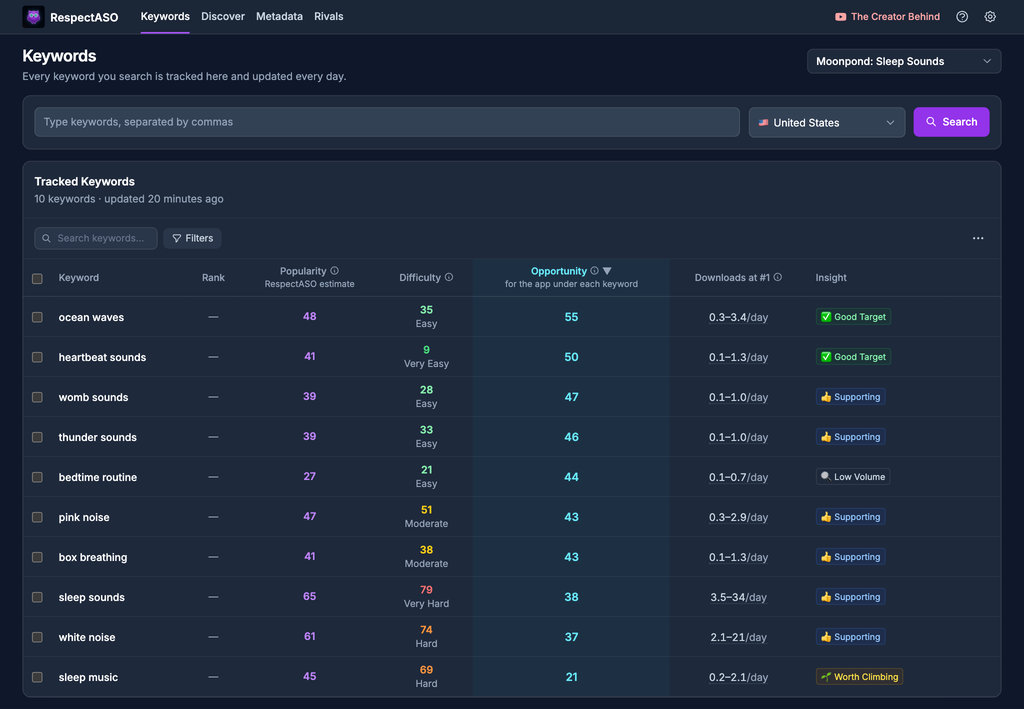
Keyword research in RespectASO: a score and a tag for every keyword
Optimize Your Weather App
Use RespectASO to research keywords and build a data-driven ASO strategy for Weather apps.