AppDrift Alternative for Indie iOS Developers: RespectASO vs AppDrift
RespectASO does the App Store Optimization work for your iOS apps, on your Mac. Here is what you get, and how it compares with AppDrift.
What You Get With RespectASO
-
Writes your store page in every language
Title, subtitle, keywords and promotional text, drafted from your own keyword research.
-
Applies it once you approve
One click writes it to App Store Connect, Restore puts any field back, and you decide when it goes to App Review.
-
Shows what each change did
Impressions, page views, downloads and conversion, 14 days before and after every change.
-
Every app on one page, every day
What each app needs today, beside its downloads, proceeds and ranks, with a Mac notification when one needs you.
-
Apple's own popularity numbers
Apple's official search popularity through your own Apple Ads key, and research in all 175 App Store storefronts.
-
Custom product pages and review replies
Pages for your best searches, created in App Store Connect, and replies in each reviewer's language.
-
Your data stays on your Mac
No RespectASO account, nothing you research sent to us, and an open-source edition under AGPL-3.0 you can read.
-
Works inside your AI assistant
All 51 tools in Claude, Cursor, Codex and VS Code, with any cloud model or a local one.
RespectASO vs AppDrift at a Glance
AppDrift is a hosted ASO workspace for indie developers and growth teams, covering the App Store and Google Play. Its site describes a listing editor with translation into 60+ languages, publishing reviewed listing text to App Store Connect, an AI screenshot generator and an AI assistant called Ari. Here is how the two compare, fact by fact.
| Aspect | AppDrift | RespectASO |
|---|---|---|
| Architecture | Hosted workspace with sign-in | Desktop app (runs locally on your Mac), plus Docker self-host |
| Store coverage | App Store and Google Play | iOS App Store, all 175 storefronts |
| Keyword data | Apple keyword popularity by country and daily rank tracking | Apple's official popularity through your own Apple Ads key, or a calibrated estimate; 7-factor difficulty and an opportunity score for your app |
| Screenshots | AI screenshot generator and screenshot studio | Your live screenshots: a custom product page puts them in the order your AI suggests for its searches |
| Open source | Commercial product | AGPL-3.0 (open source edition) |
| Data residency | Hosted workspace | Runs on your Mac; App Store Connect keys stay there and requests go straight to Apple |
| AI assistant integration | Ari, an AI ASO assistant, and an MCP and API section | First-party MCP server with 51 ASO tools, the store autopilot among them, with any cloud model or a local one via Ollama or LM Studio |
| Store autopilot: drafts, applies after your approval, measures | Yes: sends reviewed listing text to App Store Connect and compares impressions and downloads before and after (AppDrift's page, read November 13, 2026) | Yes: drafts, applies after your approval, measures, never submits to App Review |
Store Automation Compared
AppDrift and RespectASO both write store text into App Store Connect. Here is how they compare, from AppDrift's own pages as read on November 13, 2026.
| Aspect | AppDrift | RespectASO |
|---|---|---|
| What it writes | Listing text drafted and translated into 60+ languages, and screenshots | Title, subtitle, keyword field and promotional text drafted from your keyword research; complete pages in new languages; custom product pages for search themes; replies to reviews |
| Approval step | A review step for each field before publishing | One screen lists every change with old and new side by side; you untick what you don't want, one click on Apply to App Store Connect writes the rest, and Restore puts any field back |
| App Store Connect key roles | App Manager recommended in its own setup guide | One key with Marketing to write and Sales and Reports to read; Admin keys are turned down, and the one-time analytics switch uses an Admin key once without saving it |
| Measuring | Apple-reported impressions and downloads by country before and after an update, and observational metadata comparisons | Impressions, page views, downloads and conversion 14 days before and after each change, with the rank of every keyword you changed |
RespectASO never submits to App Review: it stops at Ready to submit, with a button that opens App Store Connect.
Sources: AppDrift page 1, AppDrift page 2. RespectASO's side: the store autopilot and its App Store Connect keys.
Drafts From Your Keyword Research
RespectASO starts from what people search. The autopilot drafts the title, subtitle and keyword field with the ASO Score Simulator, scored against the keywords you track, their popularity, difficulty and your app's ranks, and checks every field against Apple's limits. It also drafts promotional text, new languages, a custom product page for a search theme and replies to low-star reviews, and puts all of it on one approval screen with Restore for any field.
One Limited Key, Never Admin
AppDrift's own guide recommends a key with the App Manager role. RespectASO asks for one key with two roles, Marketing to write store text and replies and Sales and Reports to read analytics and sales, turns down Admin keys, and never submits to App Review, so a change goes live when you submit it. What the key can do.
Your Data Stays on Your Mac
RespectASO runs on your Mac. Your keywords, rivals, sales and App Store Connect keys stay there, with no RespectASO account, and nothing you research is sent to us. The AI workflows use the provider you choose, or a model running on your Mac. The privacy-first page shows where your data goes.
Everything RespectASO Does for Your Apps
RespectASO runs the whole App Store Optimization loop for your iOS apps from one Mac app: it finds the searches worth winning, writes your store page for them in every language and applies it in App Store Connect, then shows what each change did to impressions, downloads and proceeds.
Every app on one page, every day
- Apps, the page it opens on: every app's downloads, proceeds and keywords in the top 10, and under each app the lines that say what it needs next (a draft that is ready, downloads that fell, reviews waiting for a reply, a version Apple rejected, a rival that passed you), each with one button that opens the place that fixes it. How the Apps page works.
- It works while you don't: every hour it reads your store page and your reviews, every day your keyword ranks, your rivals, your downloads and your proceeds, every week Apple's top search terms, and with each new version it drafts your store text. One switch adds a Mac notification when an app needs you, at most once a day. The routine.
Find the words
- Every App Store storefront: keyword research, difficulty, competitors and the Country Opportunity Finder work in all 175 storefronts Apple operates. The supported countries page lists them, with where Apple publishes search popularity and which listing languages each storefront reads.
- Official Apple popularity data: connect your own Apple Ads API key once (no campaigns, no ad spend) and RespectASO shows Apple's official weekly search popularity from the Apple Ads Platform API. Where Apple publishes none, a built-in estimate fitted against thousands of Apple's own values fills in on the same scale. How the two sources work.
- A score for your app, from measured ranks: the opportunity score is built on where apps like yours actually land, measured on 309 real App Store searches in six countries, and scored for the app you track from its own ratings in each storefront, with the rank it assumed shown under every score. How the score is worked out.
- Rank tracking every day: your rank on every tracked keyword in every country you choose, with the move since the day before, and whole lists of up to 1,000 keywords researched across up to 5 storefronts in one search, in the background. The rank tracker.
- Top Search Terms: Apple's official most-searched terms per storefront and category, up to 500 terms across 15 categories, with weekly climbers, fallers and brand-new entries. Track any term or send it to the AI Niche Researcher in one click.
- Rival Tracker: your app against up to 10 rivals every day in up to 3 countries: ranks on your keywords with 13 months of history, ratings side by side, each rival's App Store updates, and a weekly AI summary of what their users complain about. Competitor analysis.
- AI research for your app: the AI Niche Researcher turns one seed keyword into scored candidates and ready-to-test metadata, the AI Competitor Analyzer finds the keywords your app can win from any rival, and the ASO Score Simulator scores your wording before it goes live, each scored for one of your own apps from its ratings and measured ranks. How the AI features work.
Write the store page
- Store text in every language, applied for you: Get found drafts the title, subtitle, keyword field and promotional text of every language on your page from your own keyword research, adds complete pages in new App Store languages, and checks every field against Apple's limits. One screen shows every change with old and new side by side; one click on Apply to App Store Connect writes what you keep, and Restore puts any field back. Create a version in App Store Connect and the draft can start by itself. How Get found works.
- Custom product pages, created in App Store Connect: RespectASO suggests a page for each group of searches, writes its promotional text, suggests the screenshot order, creates the page linked to its searches, and follows it through Apple's review. Custom product pages.
- Review replies in the reviewer's language: every review from every country in one place, a reply drafted in the review's language, and Post reply sends your edited reply to App Store Connect. Review replies.
- One limited key, and you stay in charge: one App Store Connect key with the Marketing and Sales and Reports roles, never an Admin key; RespectASO never deletes anything and never submits to App Review, so a version or a page goes live when you submit it. The key and what it can do.
See what happened
- Sales & growth from Apple's own reports: downloads, proceeds, in-app purchases, subscriptions and refunds per day and country, with impressions, page views and first-time downloads from App Store analytics, all in the currency you pick. The chart marks each release and each store change you applied. App Store analytics for all your apps.
- From seen to paid: one card follows the people who saw your app through opening your page, getting it and paying, and Look here first names the one step to work on, with a button that opens the tab that works on it.
- What each change did: for every applied change, impressions, page views, downloads and conversion in the 14 days before and after, with the rank of every keyword you changed. See what each change did.
Your AI, your assistant, your Mac
- A first-party MCP server: all 51 tools in Claude Desktop, Claude Code, Codex, Cursor, VS Code and other MCP clients, so your assistant reads your Apps page and its to-do lines, researches keywords, drafts store text and review replies, and reads your sales, from your own data on your Mac. RespectASO for AI assistants.
- Any AI model, any provider: type any model ID from OpenAI, Anthropic, Google Gemini or OpenRouter, so new models work the day they ship; connect any other OpenAI-compatible service (OpenCode Zen, Groq and similar) as a custom endpoint; or run a local model through Ollama or LM Studio with no per-query cost.
- Runs on your Mac: your keywords, rivals, sales and keys stay on your Mac, with no RespectASO account and nothing you research sent to us, and the open-source edition is published under AGPL-3.0. Privacy-first ASO.
The Manual Work It Replaces
Manual keyword research is slow in a very specific way: checking one keyword in one storefront means an App Store search, a scroll through the results, and notes on the top apps. That is the same round of work every time, multiplied by every keyword and every country you care about. RespectASO automates exactly that arithmetic. One search takes a list of up to 1,000 keywords across 5 storefronts and works through it in the background (you can switch tabs or quit, and it continues where it left off), and the Country Opportunity Finder checks a keyword across the storefronts you pick, which would otherwise cost an afternoon of storefront-by-storefront checking.
The routine starts on the Apps page, which shows each app's downloads, proceeds and what it needs next, and the rest runs itself: tracked keywords update by themselves every day, Apple's official popularity arrives every week with nothing to click, and bulk actions apply to your whole selection even across pages. Rival Tracker checks where your app and up to 10 rivals rank on every followed keyword each day, records their ratings and App Store updates, and collects their newest reviews, a check that would otherwise mean opening every rival's page every morning. The AI Niche Researcher turns one seed keyword into 50-70 scored candidates plus ready-to-test metadata in a single run, and through MCP your AI assistant runs the same research mid-conversation, with no app switching and no copy-pasting of scores.
Then the research has to reach the store. Updating a page by hand means writing a title, subtitle, keyword field and promotional text for every language, counting each against Apple's limits, and pasting four fields per language into App Store Connect, so five languages are twenty fields to write, check and paste for every version. Get found drafts all of them from your keyword research, checks every limit, and turns the whole update into one review and one click on Apply to App Store Connect. A custom product page by hand is another round in App Store Connect: a new page, its promotional text, its screenshots in a new order and its searches linked one by one; RespectASO drafts the page and creates it in one click once you approve it. And a review in Spanish or Japanese no longer waits for a translator: the reply is drafted in the reviewer's language, and Post reply sends it.
Finally, the question every change raises: did it help? By hand that means downloading Apple's sales reports and App Store analytics, adding up proceeds across currencies, and lining up 14 days before a change against 14 days after it, for every app. Sales & growth does that arithmetic every day from Apple's own reports, marks each release and each store change on the chart, and the Apps page puts the answer for every app on one screen.
The Bottom Line
RespectASO is a Mac app that runs App Store Optimization for your iOS apps from keywords to results: research and daily rank tracking in all 175 storefronts with Apple's official popularity through your own Apple Ads key, store text in every language, custom product pages and review replies sent to App Store Connect once you approve them, and your sales, downloads and the effect of every change from Apple's own reports, all on your Mac, with an open-source edition and the built-in MCP server for your AI assistant.
For other tools that write to App Store Connect, see how RespectASO compares to ASO.dev, Asodesk, App Radar, AppSprint, StoreLocalizer and AppsOps.
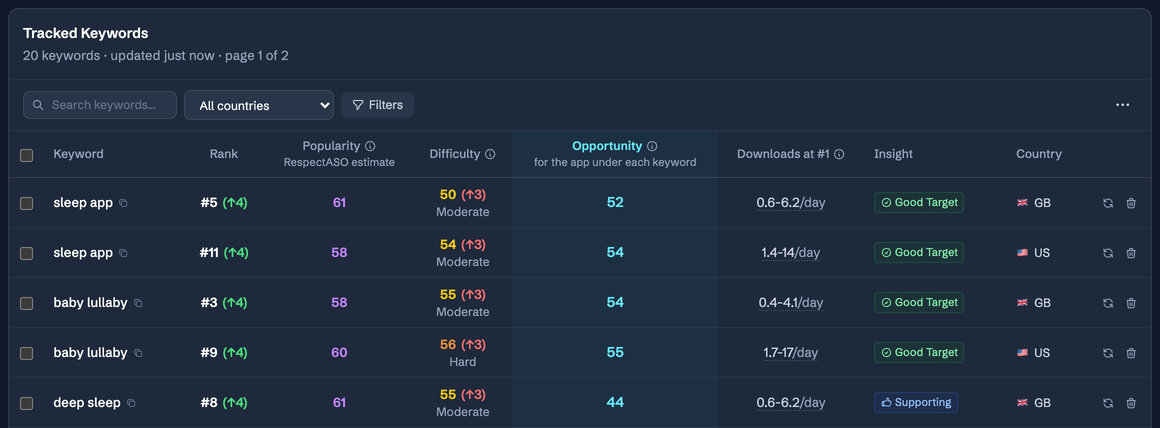
Keyword research in RespectASO
Let RespectASO do your ASO
Find the searches worth winning, apply your store page in every language and see what each change did, all from your Mac.