Apps: all your apps on one page
RespectASO opens on Apps: how each app is doing, and what to do next.
Apps is the first item of the top bar and the page RespectASO opens on. Each app you add gets a row with its numbers and, under it, the lines that say what it needs, each with one button that opens the place that fixes it. What the page gives you, in short: every app's downloads, proceeds and what to do next.
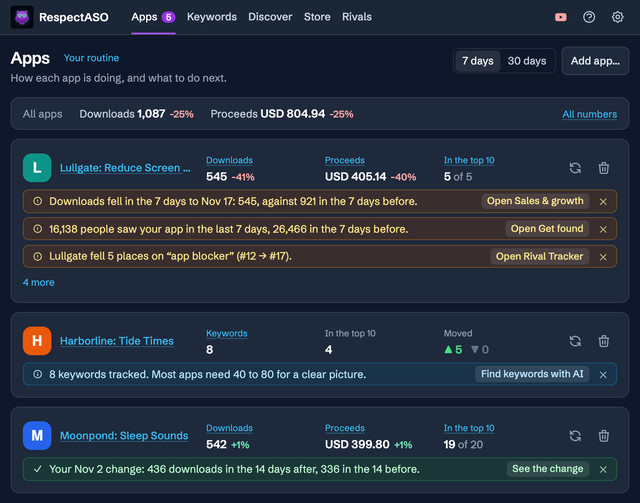
What each number means
- Downloads: downloads in the last 7 or 30 days (the switch at the top right), with the change against the 7 or 30 days before.
- Proceeds: what Apple pays you for the same days, after Apple's commission, in the currency you picked, with the change against the days before. How the currencies are converted: Sales & growth.
- In the top 10: how many of the app's tracked keywords rank in the top 10, out of all it tracks.
- Moved, for an app not linked to App Store Connect: how many keywords rose and how many fell since the day before.
The All apps line adds up downloads and proceeds across your apps, and All numbers opens Sales & growth for every app side by side. Click an app's name to open its keywords.
Every line, and what its button opens
An app shows up to three lines, the most urgent first; the rest fold behind N more. The number beside Apps in the top bar counts the lines that ask for something. The apps and numbers below are examples.
| The line | When it shows | Its button |
|---|---|---|
| Apple rejected version 2.4. Read Apple's reason in App Store Connect. | Apple turned down the version that holds your changes. | Open in App Store Connect |
| Version 2.4 has your changes. Submit it for review in App Store Connect. | Your changes are saved in a version you have not submitted yet. | Open in App Store Connect |
| Apple rejected “Sleep on the road”. Read Apple's reason in App Store Connect. | Apple turned down a custom product page RespectASO made. | Open in App Store Connect |
| “Sleep on the road” is created. Submit it for review in App Store Connect. | A custom product page waits for you to submit it. | Open in App Store Connect |
| “Sleep on the road” is live. | The page is live on the App Store. News only. | Open Custom product pages |
| Downloads fell in the 7 days to Nov 16: 545, against 921 in the 7 days before. | The last 7 days Apple reported have under 70% of the downloads of the 7 before. | Open Sales & growth |
| 9,410 people saw your app in the last 7 days, 13,600 in the 7 days before. | A step from seen to paid fell: fewer people see your app, open your page or get it. | Open Get found, or See your reviews |
| 4 reviews of 1 to 3 stars wait for a reply. | Reviews of 1 to 3 stars have no reply yet. | Open Reviews |
| A draft of your store text is ready for version 2.4. | Get found finished a draft. | Read the draft |
| 5 keywords tracked since your last draft. | You tracked 5 or more keywords since the last draft, so the next one has more to work with. | Open Get found |
| Your Nov 1 change: 448 downloads in the 14 days after, 342 in the 14 before. | From day 14 to day 28 after a store text change. | See the change |
| Lullgate fell 5 places on “app blocker” (#12 → #17). | Your app fell 5 places or more on a keyword, or left the top 10, in a country Rival Tracker follows. | Open Rival Tracker |
| A new app, Driftbell, entered the top 10 for “white noise” at #8. | What Rival Tracker saw since yesterday: a rival entered the top 10, shipped a version or changed its listing. News only. | Open Rival Tracker |
| No keywords tracked yet. | The app tracks no keywords. | Track keywords |
| 8 keywords tracked. Most apps need 40 to 80 for a clear picture. | The app tracks fewer than 20 keywords. | Find keywords with AI |
| Tracked in one country. The same keywords can pay off in other storefronts. | Every keyword is tracked in one country. | Check other countries |
| Most of your 30 keywords do not rank yet. | Fewer than 4 in 10 of them rank. | Open Get found, or Try new wording in the Simulator |
When nothing needs you, the row says Nothing to do.
Close a line with its X
Every line has an X. A closed line stays closed until something changes: a new review waiting, a new week of downloads, a new draft. Then it comes back with the news.
Notifications
One switch, Tell me on this Mac, in Settings, Mac App, turns them on or off for everything. RespectASO then tells you on your Mac when an app needs you, once a day at most, and only for a line that asks for something. News that asks for nothing, and a line you closed, never sends one. With the switch off, the Apps page still shows everything. If macOS blocks notifications from RespectASO, Settings, Mac App says so, and Open Notification Settings opens RespectASO's own entry in System Settings.
Before App Store Connect is connected
Each row shows the app's tracked keywords, how many of them sit in the top 10 and how many moved since the day before, with the keyword lines and the Rival Tracker lines. Downloads, proceeds and every store line arrive once you connect App Store Connect. The Get set up strip at the top of the page shows what is not connected yet, each with its button.
Using it every day: your routine. From your AI assistant, the same page is two tools, get_apps_overview and get_to_do: MCP integration.