Custom product pages
Show the screenshots and words that fit each kind of search.
Apple lets an app have custom product pages and show them to people searching for chosen keywords. In RespectASO they have their own tab in the Store section, Custom product pages, between Get found and Sales & growth. It needs App Store Connect connected. The overview: custom product pages, made for the searches that bring you users.
What a custom product page changes
A custom product page keeps your app's name, subtitle and icon. What it changes is what people see first: the order of your screenshots, so the one that fits the search leads, and its own promotional text, for the searches it is for. The tab says so at the top, Show each search the screenshot that fits, and the first time it shows two iPhones searching the App Store and the four steps; See each step opens How custom product pages work, four steps with a picture each: Pick the searches, AI writes the promotional text, AI puts the best screenshot first, People searching see it.
Make a custom product page
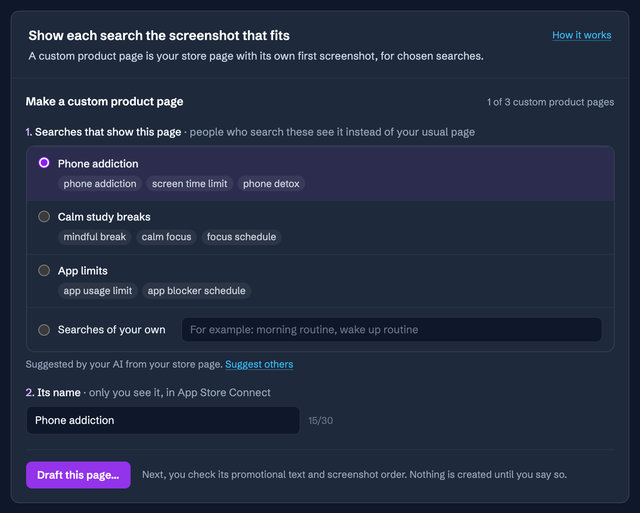
The tab is one card, Make a custom product page. Click Suggest pages and your AI reads your store page and the searches you track, and suggests up to three pages, each with the searches that should show it, phrases people type such as "phone addiction" or "screen time limit". Pick one, or type searches of your own. Suggestions are for one page: once you create a page, the next one starts with Suggest pages again. Draft this page… waits until the page has its searches and a name, and says what is missing. Every word of a search must be in your name, subtitle or keyword field and at least one must be in your keyword field, because Apple links a page only to keyword field words; when one is missing, RespectASO says which word to add on Get found. Give the page a name, which only you see in App Store Connect, and click Draft this page….
Order its screenshots, then create it
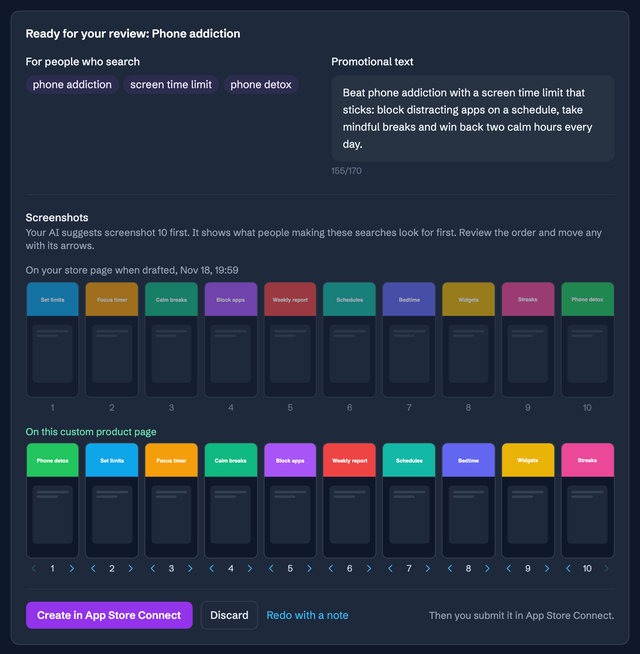
Your AI writes the page's promotional text, using the space (150 to 170 characters) and working in the searches the page is for. While the draft waits, it is the card on the tab: the searches beside the promotional text, then your iPhone screenshots in two rows, as they are on your store page now and as they will be on this page. Your AI looks at your screenshots and suggests the order, the ones that fit those searches first, with a line on why. Review it and move any with its arrows; your order is kept as you move them. When your AI model cannot look at pictures, or your AI service does not answer, the screenshots keep your store page's order and the line says why. If Apple does not list any of the page's words for your app yet, the page would show for no search, so RespectASO says so and does not create it.
Create in App Store Connect creates the page from your live version, puts its screenshots in your order, sets the promotional text and links the words. A green notice then says what RespectASO did and your next step: submit the page for review in App Store Connect, under Custom Product Pages; RespectASO never submits it. Each time the tab opens it reads where each page stands with Apple, Not submitted, Waiting for review, In review, Rejected by Apple or Live, and the notice follows the page until it is live, then says so; close it with its X and it stays closed until there is news; a page you delete in App Store Connect leaves the list. If your screenshots change in App Store Connect after a draft, Create stops and asks you to draft the page again, so its order is set on the screenshots you have now. Your custom product pages lists your app's pages, with when RespectASO made each and for which searches.
Creating product pages uses the Marketing role of the key from App Store Connect setup. If Apple turns the page down, RespectASO says why, and store text keeps working.
Product page tests
Apple's product page optimization tests vary icons, screenshots and previews, which RespectASO does not make, and Apple's API returns no test results. So RespectASO creates custom product pages and leaves tests to App Store Connect. To see how a page does, compare its numbers in App Store Connect, and your store-wide numbers on Sales & growth.
From your AI assistant
draft_product_page drafts a page for the searches you name, with a page name and a screenshot order if you give them, and apply_store_update creates it. Details on the MCP page and the overview on ASO autopilot.